An MCP server lets an AI assistant such as Claude, ChatGPT or Gemini work directly inside your ad accounts: pulling reports, and, where the platform allows it, creating and editing campaigns. Meta, Google, TikTok and Microsoft now publish their own ad MCP servers, but they differ a lot in what they let you change. This guide shows what each one can do, how to connect it to the AI you use, including Google Ads edit access through your own Google Cloud project, and how to give it edit access without risking your budget.
What is an MCP?
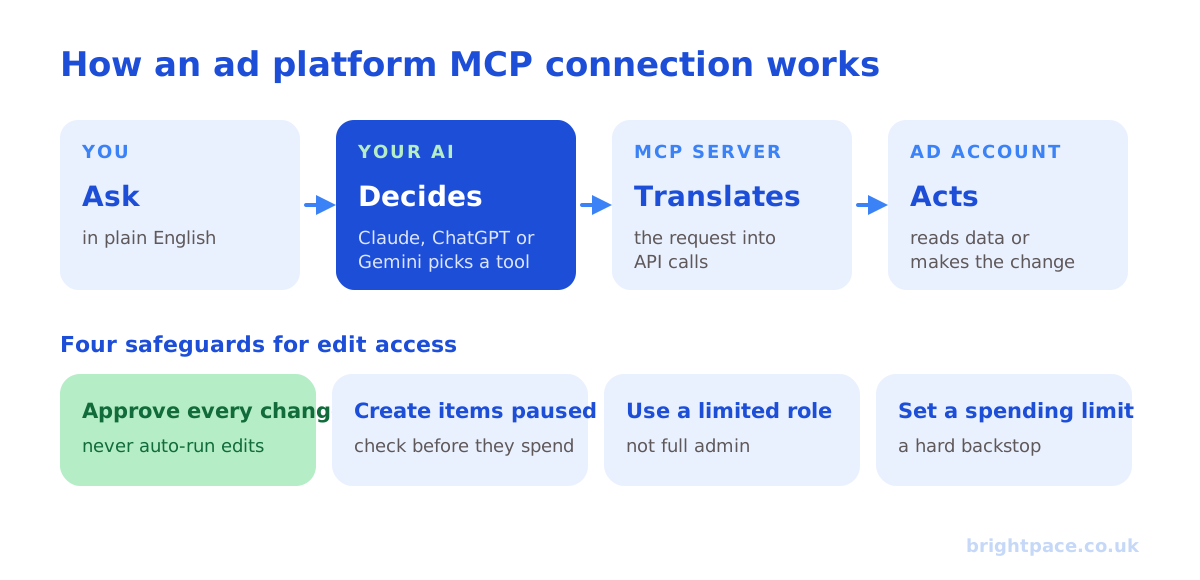
MCP (Model Context Protocol) is an open standard for connecting AI assistants to other software. An ad platform’s MCP server translates between your AI and the platform’s API: you ask in plain English, the AI chooses a tool, “get campaign performance”, “create ad set”, “update budget”, and the server carries it out in your account, using permissions you’ve granted.
Without MCP, you’d copy data out of Ads Manager and paste it into a chat. With it, the AI reads live data and, with edit access, can make the change itself.
Which ad platforms have an MCP, and which allow edits?
At the time of writing (October 2026):
| Platform | Official MCP server | Edit access | Notes |
|---|---|---|---|
| Meta (Facebook and Instagram) | Yes, hosted by Meta | Yes, create and edit campaigns, ad sets and ads | New items are created paused by default |
| Google Ads | Yes | No: read-only | Edits possible by self-hosting with your own Google Cloud project (see below) |
| TikTok | Yes, rolling out | Yes, campaign management tools | Check availability in your TikTok for Business account |
| Microsoft Advertising | Yes, open pilot | No, read-only for now | Reporting and diagnostics |
| No | Third-party servers only | Check how the vendor accesses LinkedIn’s Marketing API |
These change quickly, so check each platform’s current documentation before you rely on a feature.
Official or third-party servers?
For edit access on platforms whose official server is read-only, Google Ads and Microsoft Advertising, for now, and for LinkedIn, you’ll need a third-party MCP server, or, for Google Ads, a server you run yourself (covered below). Many exist; before connecting one to an account that spends real money, check:
- How it connects. It should use the platform’s own sign-in (OAuth) through an approved developer app: never ask for your password.
- What it can change. Look for tools you can switch off, and confirmation before writes.
- Where your data goes. Does it store your account data, and for how long?
- Who maintains it. An actively maintained server with clear documentation is safer than an abandoned project.
Where an official server covers what you need, start there.
How to connect an ad platform MCP
You’ll need the server’s address, for a hosted server like Meta’s, a URL from the platform’s documentation, and admin or advertiser access to the ad account. Menu names below are correct at the time of writing.
Claude
- Open Settings → Connectors and choose Add custom connector.
- Give it a name and paste the MCP server URL.
- Click Connect and sign in to the ad platform when prompted, approving the permissions it asks for.
- In the connector’s settings, choose which tools Claude may use without asking. Keep anything that edits, creates or spends set to ask for approval.
Custom connectors work on Claude’s free and paid plans, in the web app and Claude Desktop. Claude Desktop and Claude Code can also run servers locally on your computer, which some third-party ad servers need.
Claude Code
Claude Code adds MCP servers from the terminal rather than a settings screen:
- For a hosted server, run
claude mcp add --transport http <name> <server-url>, using the URL from the platform’s documentation. Add--scope userto make it available in every project, not just the current folder. - Start Claude Code and type
/mcp, choose the server and sign in to the ad platform in your browser when prompted. - For a server that runs on your own computer, such as a self-hosted Google Ads server, run
claude mcp add <name> -- <command to start the server>instead.
Claude Code asks before using each tool unless you allow it, so you can approve every change, just as in the web app.
Connecting Microsoft Ads to Claude Code: Microsoft’s MCP server is in an open pilot and read-only, so it’s for reporting and diagnostics rather than edits. Sign up through Microsoft Advertising’s MCP Server page to get the server address, add it with claude mcp add --transport http microsoft-ads <server-url>, then run /mcp and sign in with the Microsoft account that has access to your ad accounts. Ask it for things like “spend and conversions by campaign for the last 30 days” or “which search terms spent most without converting”.
ChatGPT
- Turn on developer mode in Settings → Apps & Connectors → Advanced settings.
- Choose Create, add a name and the MCP server URL, and set authentication to OAuth.
- Sign in to the ad platform and approve the permissions.
- In a chat, select developer mode and your connector. ChatGPT asks you to confirm before it runs a write action: read each one before approving.
Developer mode is available on paid plans, and on business plans where your workspace admin allows it. OpenAI describes it as powerful but risky, so treat it with the same care as giving someone your login.
Gemini
Google’s Gemini CLI supports MCP servers. Add one with the gemini mcp add command or in its settings.json file, using the server’s URL for hosted servers. Gemini CLI asks for confirmation before running tools unless you tell it to trust a server: don’t, for ad accounts.
Other AI tools
Most MCP-compatible tools, including Cursor, Microsoft Copilot Studio and Perplexity, connect in a similar way: add the server URL, sign in, and set which tools need approval.
Google Ads edit access through your own Google Cloud project
Google’s official MCP server is read-only: it has no tools for making changes. But the Google Ads API behind it supports almost every change you can make in the Google Ads interface, so you can get edit access by running an MCP server yourself, using your own Google Cloud project and API credentials. This is the most technical route in this guide, so expect to involve someone comfortable with Python and the command line.
What you need:
- A Google Cloud project with the Google Ads API enabled (in the Google Cloud console, under APIs & Services).
- An OAuth client in that project (a “Desktop app” client is simplest for running on your own computer), plus the OAuth consent screen set up.
- A developer token from your Google Ads manager account: find it under Admin → API Center. Its access level decides what it can do:
| Access level | What it allows |
|---|---|
| Test account access | Test accounts only: good for building and testing safely |
| Explorer access | Production accounts, up to 2,880 operations a day, usually enough for small accounts |
| Basic access | Up to 15,000 operations a day, after applying to Google |
| Standard access | Unlimited operations, after applying to Google |
- A credentials file (usually called
google-ads.yaml) containing your developer token, OAuth client ID and secret, a refresh token, and your manager account ID as the login customer ID.
Then, to add edits:
- Run an MCP server locally: the official server’s code is open source and runs with these credentials, and connect it to Claude Desktop, Claude Code or Gemini CLI through their configuration files.
- Add write tools. Either use an open-source or third-party server that includes them and works with your own credentials, or have a developer extend a self-hosted server with a small set of changes you actually need: for example pausing campaigns, updating budgets and adding negative keywords.
- Keep the tool list short. A server that can only pause, change budgets within limits and add negatives is far safer than one that can do anything.
Safety features worth using:
- Dry runs. The Google Ads API has a validate only option that checks a change without making it: ideal for previewing what an AI is about to do.
- Test accounts first. Build and test against a Google Ads test account before pointing the server at real spend.
- A dedicated, limited user. Generate the refresh token with a Google account that has only the access it needs, on only the accounts it should touch.
- Change history. Every API change appears in Google Ads’ change history, so you can see exactly what was done.
Running it locally works with desktop tools. To use it from Claude or ChatGPT in a web browser, the server has to be hosted at a public address with proper sign-in: a bigger project. Google’s API terms also apply: you’ll describe your use case when you apply for higher access levels.
Giving AI edit access safely
Reading reports is low risk. Edit access is where an AI can spend real money, so set it up the way you’d onboard a new junior hire:
- Start read-only. Use the AI for reporting and diagnosis for a couple of weeks before allowing edits, so you learn how it interprets your accounts.
- Approve every change. Never set write tools to run without asking. Read what it’s about to do: the campaign, the old value and the new one.
- Create things paused. Meta’s server does this by default. For other platforms, tell the AI to create everything paused so you can check it before it spends.
- Sign in with a limited role. Connect with a user that has only the access it needs, for example, an advertiser role rather than full admin, and only to the accounts you want it to touch.
- Set a hard spending backstop. An account spending limit in Meta or an account budget in Google Ads caps the damage if something goes wrong.
- Give it rules. Add standing instructions such as “never raise a budget by more than 20% at once”, “never delete: pause instead” and “always show me a summary of changes before making them”.
- Check the change history. Google Ads’ change history and Meta’s activity log show every edit made through the API. Review them weekly.
- Test on a small account first: or a single low-budget campaign, before connecting the accounts that matter.
Example prompts for edit access
- “Show me every ad in the prospecting campaign with a cost per purchase above £60 over the last 14 days and at least £100 spent. Don’t change anything yet.” Then: “Pause those ads.”
- “Duplicate the best-performing ad set from last month into a new ad set with these three new videos. Create it paused.”
- “Which campaigns are on track to overspend this month? Suggest new daily budgets that land on target, and wait for my approval.”
- “Add these 20 search terms as negative keywords to the brand campaign”: via a self-hosted or third-party server that allows Google Ads edits.
Notice the pattern: ask for the analysis first, then approve the change. It’s slower than one instruction, but it’s how you catch mistakes.
Where AI agents fit
An AI agent is an AI given tools and a goal that it works through in several steps, checking data, deciding what to do, acting and checking again, rather than answering one question. Connect an agent to ad platform MCPs and it can run routines such as:
- A daily health check: spotting overspending campaigns, broken tracking, disapproved ads and sudden cost changes.
- Creative fatigue monitoring: flagging ads whose frequency and cost per result are rising.
- Budget pacing: recommending shifts so monthly spend lands on target.
- Weekly reporting: drafting a plain-English summary from live data, like our sample weekly report.
The safest set-up is propose and approve: the agent drafts a change plan, a person approves it, and only then does it act, within limits you’ve set, such as a maximum budget change. Fully unsupervised agents with edit access are possible, but one misread instruction can spend a month’s budget in a day.
AI is also changing how people find businesses, not just how ads are run: see our guide to getting found in ChatGPT and AI answers, and our view on ChatGPT ads.
What MCPs don’t change
An AI with edit access is only as good as the data and the judgement behind it. It still needs accurate conversion tracking, see offline conversion tracking and the Meta Conversions API, targets set from your margins, and someone who knows when a platform’s numbers are overstating results. MCPs make the work faster; they don’t decide what good looks like.
FAQs
What is an ad platform MCP server?
It’s a connector, built on the open Model Context Protocol, that lets an AI assistant such as Claude, ChatGPT or Gemini read data from and, where allowed, make changes in an ad platform like Meta, Google Ads or TikTok, using permissions you grant.
Can Claude or ChatGPT edit my Meta ads?
Yes. Meta’s official MCP server supports creating and editing campaigns, ad sets and ads, and works with Claude, ChatGPT and other MCP-compatible tools. New items are created paused by default, and you should approve each change before it runs.
Can AI edit Google Ads through MCP?
Not through Google’s official server, which is read-only at the time of writing. You can get edit access by running an MCP server yourself with your own Google Cloud project, a Google Ads developer token and write tools added, or by using a third-party server that supports edits.
How do I connect Microsoft Ads to Claude Code?
Get the server address from Microsoft Advertising’s MCP Server pilot, add it with claude mcp add --transport http microsoft-ads <server-url>, then run /mcp in Claude Code and sign in. Microsoft’s official server is read-only for now, so it can report on your account but not change it.
Do I need to know how to code?
Not for hosted servers like Meta’s: you paste a URL, sign in and approve permissions. Self-hosting a server, for example for Google Ads edit access through your own Google Cloud project, does need some technical set-up.
Is it safe to give an AI edit access to my ad accounts?
It can be, with safeguards: approve every change, create new items paused, connect with a limited role, set an account spending limit, and review the change history. Start read-only and add edit access once you trust how it works.
Will AI agents replace paid media managers?
They take over a lot of the repetitive work: reporting, monitoring and routine changes. The judgement still matters: setting targets from your economics, knowing which numbers to trust, and deciding what to test next.
In short
Ad platform MCPs connect your ad accounts to Claude, ChatGPT or Gemini. Meta’s official server allows edits, Google’s and Microsoft’s are read-only for now (Google Ads edits are possible by self-hosting with your own Google Cloud project), TikTok’s is rolling out with campaign tools, and LinkedIn relies on third-party servers. Connect them by adding the server URL and signing in, start read-only, and when you allow edits, approve every change, create things paused and set a spending backstop. AI agents add the most value in a propose-and-approve set-up.
Sources
The platform documentation and coverage this guide is checked against. Last checked October 2026.
- What is the Model Context Protocol (MCP)?, Model Context Protocol
- Ads MCP Server overview, Meta for Developers
- google-ads-mcp: the official Google Ads MCP server, Google Ads on GitHub
- Microsoft MCP Server, Microsoft Advertising
- TikTok launches MCP server to let AI agents run campaigns, Digiday
Want an experienced specialist running your paid media? See how we work, or let’s chat.
Want a senior eye on your paid media strategy?
Work directly with the founder: no juniors, no hand-offs, 30-day rolling contracts.