The Meta Conversions API (often shortened to CAPI) is a server-to-server connection that sends conversion events, purchases, leads, sign-ups, directly from your website server, CRM or app backend to Meta, rather than relying only on the Meta Pixel running in a visitor’s browser. Used alongside the Pixel, it gives Meta a more complete and reliable picture of what your ads actually drive, which improves measurement, optimisation and audience building.
If you run Facebook or Instagram ads and your tracking still depends on the Pixel alone, the Conversions API is one of the highest-value fixes you can make. Here’s what it is, how to implement it and the questions we’re asked most.
What is the Meta Conversions API?
The Meta Pixel is a piece of JavaScript that fires in the browser when someone views a page, adds to basket or buys. It works well: until something gets in the way: ad blockers, browser tracking protections, cookie restrictions, slow pages or people leaving before the script loads. Every event the Pixel misses is a conversion Meta can’t see, learn from or credit.
The Conversions API sends the same events from your server instead. Because the data doesn’t depend on the browser, it’s far more resilient. Meta then combines the two sources, the Pixel and the Conversions API, and removes duplicates, so each conversion is counted once.
It can also send events the Pixel could never see:
- Offline and CRM events: a lead that becomes a qualified opportunity or a closed deal, a phone sale, an in-store purchase
- Later outcomes: a subscription renewal or a trial that converts to paid
- App and backend events: where you control the data on your own systems
Meta retired its separate Offline Conversions API in May 2025, so offline events now flow through the Conversions API too, labelled with an action_source that says where they happened.
Why it matters
Meta’s delivery system, including Advantage+ campaigns, optimises toward the conversions it can see. Better data means:
- More complete measurement: fewer missing conversions in Ads Manager
- Better optimisation: the algorithm learns from a fuller set of signals, which matters more than ever now creative does much of the targeting
- Stronger audiences: more accurate retargeting and lookalike seed audiences, built on your own first-party data
- Value-based bidding that works: accurate purchase values let Meta optimise toward revenue, not just order count
- Optimisation to real outcomes: for lead generation, sending qualified leads from your CRM lets Meta chase quality rather than form-fills
It won’t fix a weak offer or poor creative, but it removes a common hidden handicap: an algorithm learning from half the data.
How the Conversions API works
Each event you send contains three kinds of information:
- Event details: the event name (such as
PurchaseorLead), the time it happened, the page URL and theaction_source(for examplewebsite,app,physical_storeorsystem_generated) - Customer information: used to match the event to a Meta account: email, phone number, name, city, postcode and more, hashed with SHA-256 before sending, plus unhashed technical identifiers such as IP address, browser user agent and Meta’s
fbpandfbccookie values - Custom data: the value, currency, content IDs and other details, such as order value and product IDs for a purchase
Meta matches the event to a person, attributes it to any ads they saw or clicked, and uses it for reporting and optimisation. Web events should be sent in real time or close to it; Meta rejects website events more than seven days old.
How to implement the Meta Conversions API
There are four main routes. The right one depends on your platform, your technical resource and how much control you need.
1. Partner integrations (easiest)
Many platforms have a built-in Conversions API connection you can switch on without code:
- Shopify: install Meta’s Facebook & Instagram app and choose the highest customer data-sharing setting, which turns on the Conversions API
- WooCommerce, WordPress, BigCommerce, Wix and others: official plugins or native integrations
- CRMs and lead tools: integrations or tools such as Zapier for sending CRM stages as events
This is the fastest route for most small and mid-sized eCommerce brands. The trade-off is less control over exactly which data is sent.
2. Conversions API Gateway
Meta’s own low-code option. It runs in a cloud account you control and sends events automatically based on your Pixel activity. It suits businesses that want server-side tracking without building an integration, but it does involve some cloud setup and running cost.
3. Server-side Google Tag Manager
If you already use Google Tag Manager, a server-side GTM container, hosted on your own cloud account or through a hosting provider such as Stape, can send events to Meta through a Conversions API tag. It’s a flexible middle ground: one server-side setup that can feed Meta, Google Ads, GA4, TikTok and others from the same data, with control over what each platform receives.
4. Direct integration (most control)
Your developers send events straight to Meta’s Graph API from your own backend. It’s the most work, but gives full control, and it’s the natural route for sending CRM outcomes, such as a lead becoming a sale, back to Meta.
Step-by-step setup
Whichever route you choose, the process looks like this:
- Audit your current Pixel. Check which events fire, whether they fire once, and whether values and currencies are correct. Fix the basics first: the same principle as our Google Ads audit checklist.
- Choose your events. Start with the ones you optimise toward,
PurchaseorLead, then addAddToCart,InitiateCheckoutandCompleteRegistrationas needed. - Pick your implementation route from the four above.
- Send the same events from both Pixel and server, with a matching event ID on each (see deduplication below).
- Pass strong customer information: hashed email and phone at minimum where you have consent, plus IP address, user agent,
fbpandfbc. - Test in Events Manager. Use the Test Events tool to check that server events arrive, carry the right parameters and are deduplicated against Pixel events.
- Monitor Event Match Quality and diagnostics for the first few weeks, and fix any warnings Events Manager shows.
Deduplication: the step people get wrong
Running the Pixel and the Conversions API together is Meta’s recommended setup, but only if each conversion is counted once. Meta deduplicates events using two fields:
- Event name: must match exactly, for example
Purchasefrom both sources - Event ID: the Pixel’s
eventIDmust match the Conversions API’sevent_id, such as your order ID
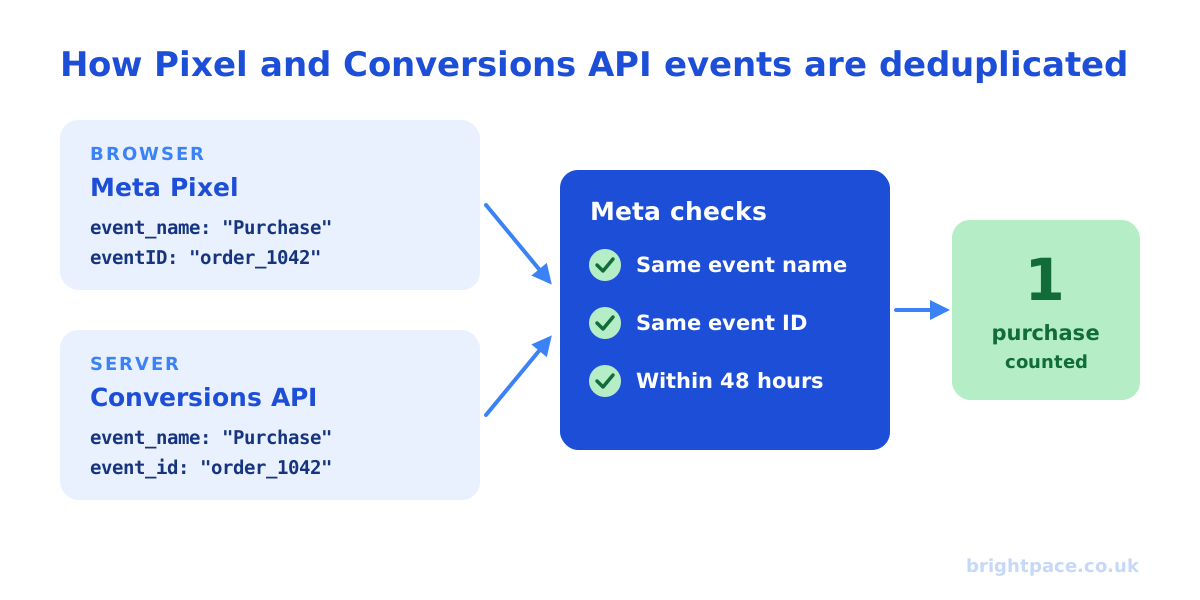
Meta only deduplicates events received within 48 hours of the first event with that ID. Get this wrong and you’ll see inflated conversions, a flattering ROAS and an algorithm optimising on double-counted data, so always check it in the Test Events tool before trusting the numbers.
Event Match Quality
Event Match Quality (EMQ) is a score out of 10 in Events Manager showing how well the customer information you send matches events to Meta accounts. Better matching means more conversions attributed and better optimisation.
To improve it:
- Send hashed email and phone wherever you legitimately have them: at checkout, sign-up or lead forms
- Include IP address and user agent on web events
- Pass the
fbpandfbcvalues from the browser to your server - Add an external ID, such as a hashed customer ID, where you have one
- Normalise before hashing: lowercase emails, remove spaces, add country codes to phone numbers
Privacy and consent
The Conversions API doesn’t change your legal obligations. In the UK, sending personal data to Meta for advertising requires a lawful basis under UK GDPR, and marketing cookies and similar tracking need consent under PECR. In practice:
- Respect consent choices. If someone rejects marketing cookies, don’t send their data to Meta through the server instead.
- Hash customer information as Meta requires, and only send what you need.
- Update your privacy policy to explain server-side sharing with advertising platforms.
- Check your consent banner actually controls both browser and server tags. Our free tracking checker shows whether your Meta pixel fires before consent and whether the click ID is stored.
Server-side tracking is about reliability and data quality, not a way round consent.
Common mistakes
- Sending server events without deduplication, doubling conversions
- Mismatched event names, such as
purchasefrom one source andPurchasefrom the other - Missing or zero purchase values, so value optimisation has nothing to work with
- Sending customer data unhashed, or hashed without normalising first
- Ignoring consent choices on the server side
- Setting it up once and never checking diagnostics again
Key FAQs
Do I still need the Meta Pixel if I use the Conversions API?
Yes, for most websites. Meta recommends running both: the Pixel captures browser signals and on-site behaviour, and the Conversions API adds reliability and server-only events. Deduplication stops double-counting.
Is the Meta Conversions API free?
Meta doesn’t charge for the API. Costs come from implementation: developer time for a direct integration, cloud hosting for the Conversions API Gateway or server-side GTM, or fees for third-party tools. Shopify’s native integration adds no extra cost.
Does the Conversions API fix iOS tracking?
It helps, but it doesn’t bypass Apple’s App Tracking Transparency or users’ privacy choices. What it does is recover conversions lost to browser limitations and ad blockers, and improve matching, so Meta sees more of the conversions it’s allowed to see.
How long does it take to set up?
A Shopify or plugin integration can be switched on quickly. Server-side GTM or a direct integration takes longer, depending on your site and developer resource. Allow time for testing: deduplication and match quality are where most of the value is won or lost.
What is a good Event Match Quality score?
Higher is better, and Meta shows guidance for each event in Events Manager. Focus on your main conversion events and on passing more of the customer information you legitimately hold, rather than chasing a specific number.
Can I send offline and CRM conversions?
Yes. Offline sales, phone orders and CRM stages, such as a lead becoming a qualified opportunity or a customer, can all be sent through the Conversions API with the appropriate action_source. For lead generation this is one of the most valuable uses, because it lets Meta optimise toward leads that turn into revenue.
Will the Conversions API improve my results?
Better data usually means better measurement and optimisation, but the size of the impact varies by account, how much the Pixel was missing and how well the setup is done. Judge it on blended business results, revenue, new customers and cost per acquisition, rather than on platform-reported conversions alone, and consider incremental attribution for a truer view of what Meta adds. Our ROAS and CPA calculators help set the targets.
Does TikTok have an equivalent?
Yes: TikTok’s Events API does the same job alongside the TikTok Pixel. See our TikTok Smart+ best practices. Google’s equivalent is enhanced conversions, covered in structuring campaigns for automation.
In short
The Meta Conversions API sends conversion data from your server to Meta, so it doesn’t depend on the browser. Run it alongside the Pixel, deduplicate with matching event names and IDs, send strong hashed customer information, respect consent, and check Events Manager regularly. Done properly, Meta sees more of what your ads really drive, and optimises accordingly.
Sources
The platform documentation and coverage this guide is checked against. Last checked October 2026.
- Conversions API, Meta for Developers
- Handling duplicate Pixel and Conversions API events, Meta for Developers
- Best practices for the Conversions API, Meta Business Help Centre
- Dataset Quality API (Event Match Quality), Meta for Developers
- Cookies and similar technologies (guide to PECR), ICO
Want your Meta tracking set up properly? We set up server-side tracking and the Conversions API as a standalone project. It’s also the first layer of our measurement service, and part of every Meta ads account we run through paid social, including for eCommerce brands. Let’s chat, or have us check your setup with a paid audit.
Want a senior eye on your paid social?
Work directly with the founder: no juniors, no hand-offs, 30-day rolling contracts.