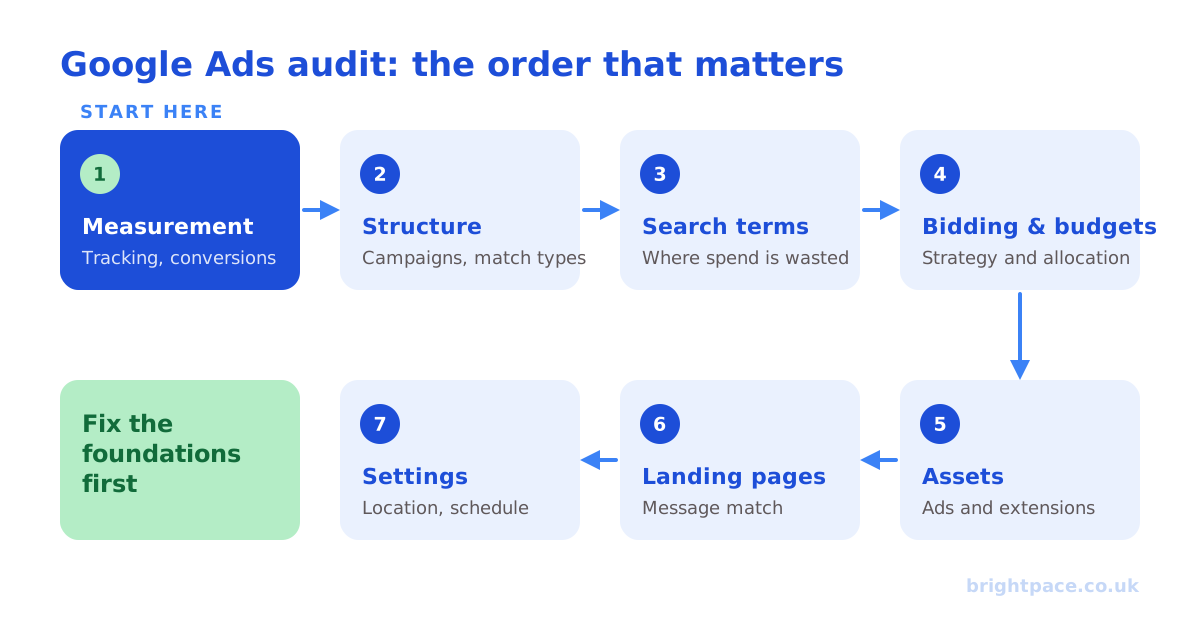
A Google Ads audit is a structured review of an account’s setup, spend and performance to find wasted budget, fix tracking gaps and uncover growth. A good audit works from the foundations up, measurement first, then structure, then bidding and creative, because a change to bidding is meaningless if the conversion data underneath it is wrong.
Use the 12 points below as a repeatable checklist. Work top to bottom: the early items are the ones that quietly break everything else.
Before you start
Get three things in place before opening a single report:
- The business context. Margins, average order or lead value, and what the business actually wants: profit, growth or new customers. Without this, you can’t tell good performance from bad.
- A sensible date range. Usually the last 90 days, compared with the previous period: longer if the business is seasonal.
- Access to analytics and the CRM, not just Google Ads, so you can compare what Google reports with what really happened.
1. Audit conversion tracking first
Nothing matters more. Everything Google optimises toward comes from here.
- Check every meaningful action is tracked once: no duplicate tags, and no double counting between Google Ads and imported GA4 conversions. (See how to set up GA4 key events.)
- Confirm primary conversions are the ones that matter (purchases, qualified leads), with micro-conversions set as secondary.
- Make sure conversion values are accurate, ideally reflecting margin or lead quality.
- Check enhanced conversions are on, and that Consent Mode v2 is set up correctly for UK and EEA users.
Red flag: a conversion rate that looks too good to be true, it usually means page views or clicks are being counted as conversions.
2. Check conversion quality, not just volume
A lead is not a sale. If Google only sees form-fills, it will find you more form-fills, including junk.
- Feed offline conversions (qualified leads, closed deals) back from your CRM so Google optimises toward revenue.
- Compare Google-reported conversions with actual sales or qualified leads for the same period.
This is where most lead-generation accounts leave the most money on the table.
3. Account structure
Structure should map to how you go to market, not to a template. Look for:
- Campaigns split by intent, product line and margin, not everything lumped together
- Ad groups tight enough that ads and keywords stay relevant
- Brand and non-brand separated, so brand doesn’t flatter your blended numbers
- A clear role for each campaign type: Search, Shopping and Performance Max shouldn’t be competing for the same searches without a plan
Our guide to structuring campaigns for automation covers what good looks like.
4. Search terms and wasted spend
Pull the search terms report for the last 90 days, including Performance Max, which now has its own search terms reporting.
- Hunt for irrelevant queries eating budget: jobs, free, DIY, competitors you don’t want, wrong locations.
- Add negative keywords, and build shared negative lists you can apply across campaigns: our keyword match type tool formats them in seconds.
Red flag: a large share of spend on searches that have never converted.
5. Match types and keyword overlap
Broad match can work well, but only with strong conversion data and negatives guiding it.
- Check for keywords competing against each other, and duplicate coverage across campaigns.
- If you use broad match, or Google’s new AI Max features, make sure brand controls, negatives and URL exclusions are in place.
6. Bidding strategy
Match the strategy to the goal and the data volume.
- Target CPA and Target ROAS need enough conversions to learn. Switching a low-volume account to a fully automated strategy too early starves it.
- Check targets are set to protect profit: see what a good ROAS actually is, or work back from a target with our CPA calculator.
- Look for campaigns stuck in learning because of constant changes.
7. Budgets and where they’re going
Are budgets concentrated on the campaigns that drive commercial outcomes, or spread evenly out of habit?
- Check search lost impression share (budget): profitable campaigns limited by budget are your easiest growth.
- Check search lost impression share (rank): a sign of low bids or poor ad quality.
- Look for steady losers that have never earned their budget.
8. Ads and assets
- Every ad group should have enough headlines, descriptions and assets, sitelinks, callouts, images, for Google to test. Draft and check them with our Google Ads ad preview tool.
- Review any AI-generated text from automatically created assets or AI Max text customisation to make sure it’s accurate and on-brand.
- Check pinning isn’t so heavy that it blocks testing.
Ad Strength is a guide, not a goal: relevance and a clear offer beat a green label.
9. Landing page alignment
The click is only half the job.
- Does the landing page match the ad’s promise, load fast on mobile and make the next step obvious?
- If final URL expansion is on, check which pages Google is sending traffic to, and exclude any that shouldn’t receive paid visits.
A great account pointed at a weak page will always underperform.
10. Audiences and exclusions
- Are first-party audiences, customer lists and website visitors, added, at least in observation mode, to give bidding more signal?
- Are existing customers excluded where the goal is new-customer acquisition?
- Are remarketing lists sized and refreshed properly, and is personalised advertising on for any GA4 audiences (how to sync GA4 audiences)?
11. Location, schedule and device
- Break performance down by location, time of day and device: most accounts have segments quietly dragging efficiency down.
- UK red flag: check the location option. Google’s default targets people in or interested in your locations. If you only serve your area, common for local services, law firms and clinics, switch to people in or regularly in your target locations.
12. Settings, change history and hygiene
- Auto-applied recommendations can change keywords, bids and ads without you noticing. Review which are switched on.
- Check Search campaigns aren’t unintentionally opted into the Display Network or Search Partners.
- Review change history: frequent, reactive changes prevent automated bidding from learning.
- Look for clear naming conventions and a documented testing approach.
How to prioritise what you find
An audit that produces fifty equal recommendations isn’t useful. Sort findings by impact and effort:
- Fix measurement issues first: everything else depends on them.
- Quick wins: negatives, budget reallocation, location settings, auto-applied recommendations (see our 5 Google Ads quick wins).
- Structural changes: campaign structure, bidding strategy, landing pages, planned and tested properly.
DIY vs independent audit
This checklist will catch the most common problems. An independent audit adds two things a self-audit can’t: an outside view with no stake in past decisions, and experience of what “good” looks like across many accounts. If you’d like one, our paid media audit is fixed-price, senior and comes with a prioritised action plan you keep.
Frequently asked questions
How long does a Google Ads audit take?
A focused self-audit of a small account can take a few hours. A thorough audit of a larger account, including tracking, structure and landing pages, typically takes several days.
How often should you audit a Google Ads account?
A light review monthly, search terms, budgets, recommendations, and a full audit at least once a year, or whenever performance changes sharply, before peak season, or when you change agency or team.
What is the most common Google Ads problem?
Broken or inflated conversion tracking. If Google is optimising toward the wrong conversions, every other setting is working against you.
In short
Audit in this order: measurement → structure → search terms → bidding and budgets → assets → landing pages → settings. Fix the foundations before touching the tactics, or you’ll optimise toward the wrong numbers.
Sources
The platform documentation and coverage this guide is checked against. Last checked October 2026.
- About conversion measurement, Google Ads Help
- About the search terms report, Google Ads Help
- About negative keywords, Google Ads Help
- About keyword matching options, Google Ads Help
- About Smart Bidding, Google Ads Help
- About applying recommendations automatically, Google Ads Help
- About Quality Score for Search campaigns, Google Ads Help
Want a senior pair of eyes on your account? A Brightpace paid media audit gives you a prioritised, commercially focused action plan, or if you’d like us to run the account, explore our Google Ads management. Whichever fits, let’s chat.
Want a senior eye on your paid search?
Work directly with the founder: no juniors, no hand-offs, 30-day rolling contracts.