To sync Google Analytics 4 (GA4) audiences to Google Ads, link your GA4 property to your Google Ads account with personalised advertising turned on, build the audiences in GA4, and they appear in Google Ads’ Audience manager within a day or two, ready to use in your campaigns. The link is the easy part. The value comes from building audiences you can act on, and the most common reason it fails is a single setting: personalised advertising switched off on the link, so the audiences never arrive.
This guide covers the setup step by step, the best ways to use GA4 audiences in Google Ads, and the mistakes we see most often.
Why use GA4 audiences in Google Ads?
Google Ads can build its own website visitor lists from the Google tag, and for a simple “everyone who visited” list that’s fine. GA4 audiences go further:
- Richer conditions. Build audiences from engagement (time on site, number of sessions), any event and its parameters (for example, basket value or the product category viewed), sequences (“viewed pricing, then didn’t enquire”) and exclusions.
- Predictive audiences. GA4 can model users likely to purchase in the next 7 days or likely to become your top spenders, once you have enough data.
- One definition, used everywhere. The same audience works in GA4 reports, Google Ads, Display & Video 360 and Search Ads 360, so analysis and targeting use the same groups of people.
- Exclusions that save money. Recent buyers and recent enquirers can be kept out of prospecting and retargeting, so you stop paying to reach people who have already converted.
From experience
The best use I've found isn't classic retargeting. It's using GA4 audiences as signals for Performance Max and Demand Gen. Point the automation at your high-value purchasers or most engaged visitors and it starts in the right place, instead of spending the first weeks working out who your customers are.
How to sync GA4 audiences to Google Ads, step by step
Before you start
- Editor access to the GA4 property and admin access to the Google Ads account.
- The Google tag or GA4 installed on every page, with the events your audiences need (such as
add_to_cart,purchaseorgenerate_lead) already arriving. Our guide to setting up GA4 key events covers this. - A consent banner wired to Consent Mode. In the UK, people who decline advertising cookies aren’t added to remarketing lists, so expect your lists to be smaller than your traffic.
Step 1: Link GA4 to Google Ads
- In GA4, go to Admin → Product links → Google Ads links → Link.
- Choose the Google Ads account (or accounts) to link. Linking a manager account (MCC) shares audiences with every account under it.
- In the settings, make sure Enable personalised advertising is on. This is what lets your audiences be used for ads. Turn on auto-tagging too, if it isn’t already.
- Review and submit.
Step 2: Check the data collection settings
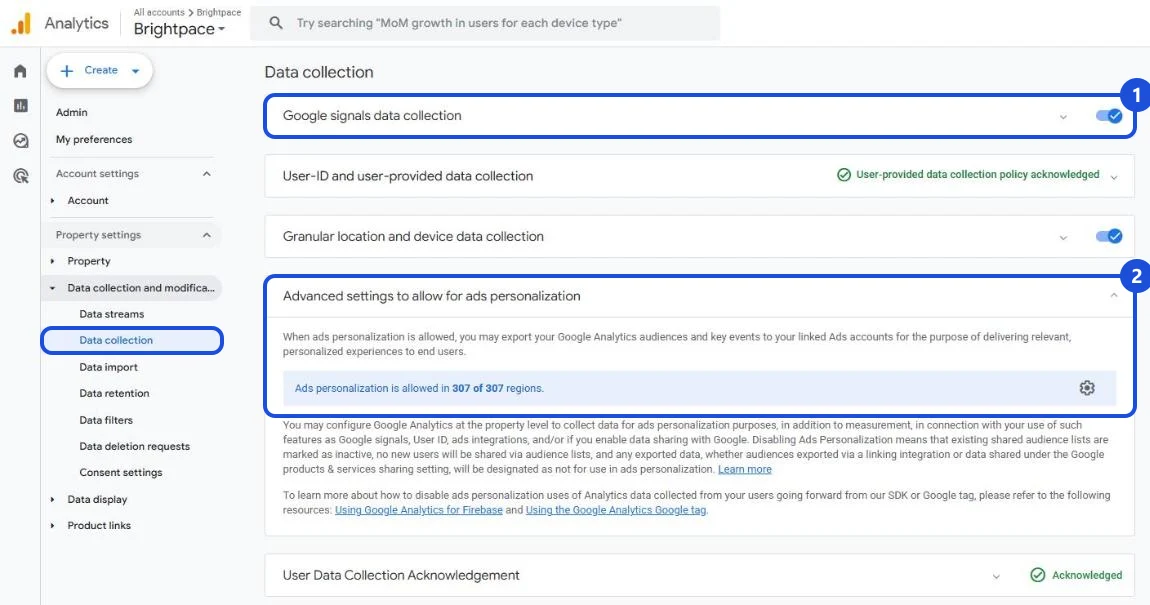
In GA4, go to Admin → Data collection and modification → Data collection:
- Google signals: Google recommends turning it on so audiences populate correctly in Google Ads.
- Advanced settings to allow for ads personalization: open this section and check that ads personalisation is allowed for the countries you advertise in, including the UK.
Step 3: Build the audience in GA4
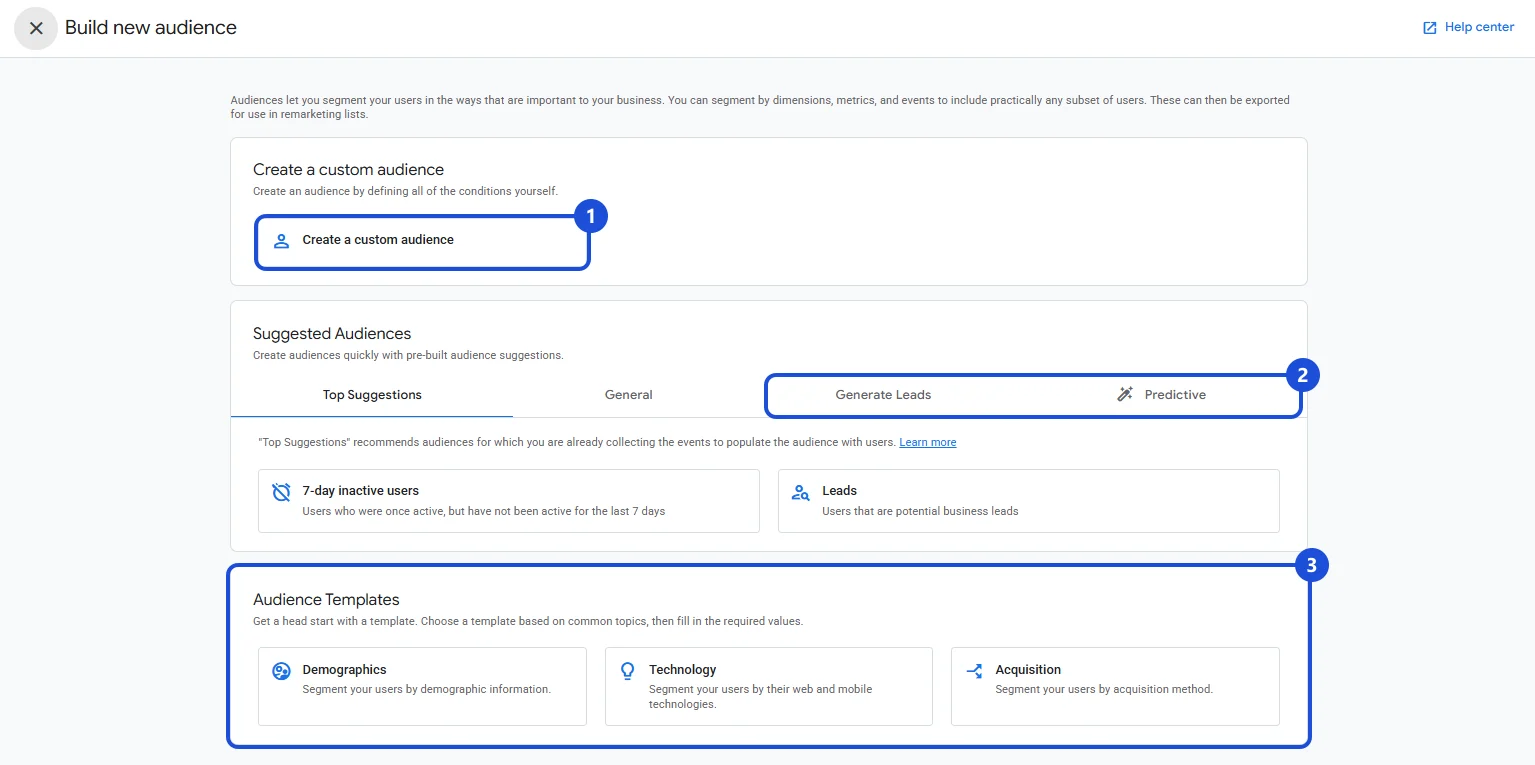
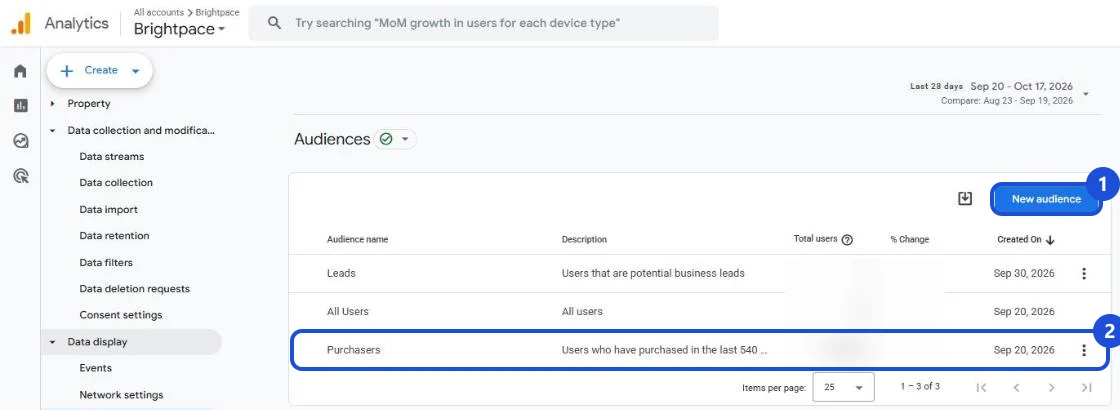
- Go to Admin → Data display → Audiences → New audience.
- Choose Create a custom audience (1), a suggested audience, including the Generate Leads and Predictive tabs (2), or an audience template (3).
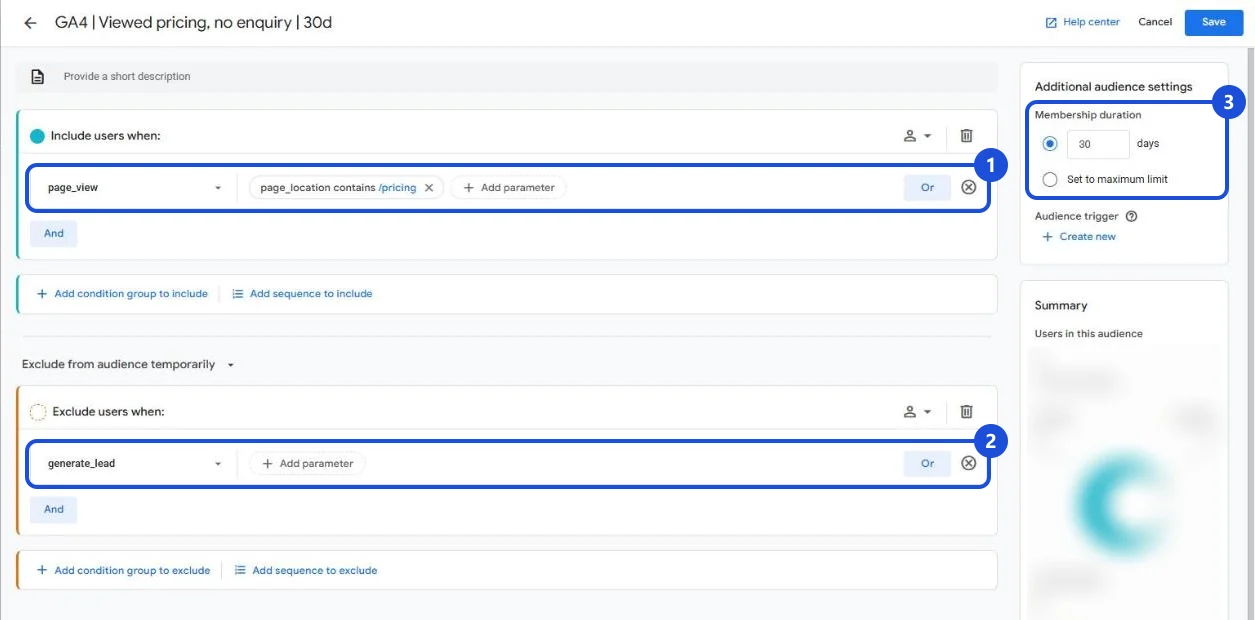
- Add the conditions: who to include, who to exclude, and any sequence.
- Set the membership duration: how long someone stays in the audience after they qualify, up to a maximum of 540 days. Match it to your buying cycle: a few days for an abandoned basket, months for a considered B2B purchase.
- Give it a clear name, for example
GA4 | Cart abandoners | 14d, so it’s obvious in Google Ads what the list is and how long it lasts.
You can also build GA4 audiences from inside Google Ads with its GA4 audience builder, which shares them with linked accounts automatically.
Step 4: Wait for it to fill
GA4 backfills a new audience with up to 30 days of past data, where available, and it usually starts populating within 24 to 48 hours. In Google Ads, a new list can take 48 to 72 hours to fully populate. Nothing older than 30 days is added, so build the audiences you’ll need before you need them.
Step 5: Find it in Google Ads
In Google Ads, go to Tools → Shared library → Audience manager → Your data segments. GA4 audiences are listed there with their size on each network. To serve, a list needs at least 100 active users in the last 30 days on Search, YouTube and Display. If you’re comparing sizes with GA4, look at GA4’s “Advertising” segment, not the total: it shows the users who can actually be reached with ads.
Step 6: Add it to your campaigns
How you add an audience depends on the campaign type:
- Search and Shopping: add audiences as Observation to see how those people perform and give Smart Bidding more context, or as Targeting to show ads only to them.
- Performance Max: add audiences to an asset group as an audience signal. Signals are hints, not targeting: Performance Max will still go beyond them.
- Demand Gen, Display and YouTube: use audiences to target, and as a seed for lookalike segments in Demand Gen.
- Exclusions: add recent purchasers or converters as exclusions on prospecting and retargeting campaigns.
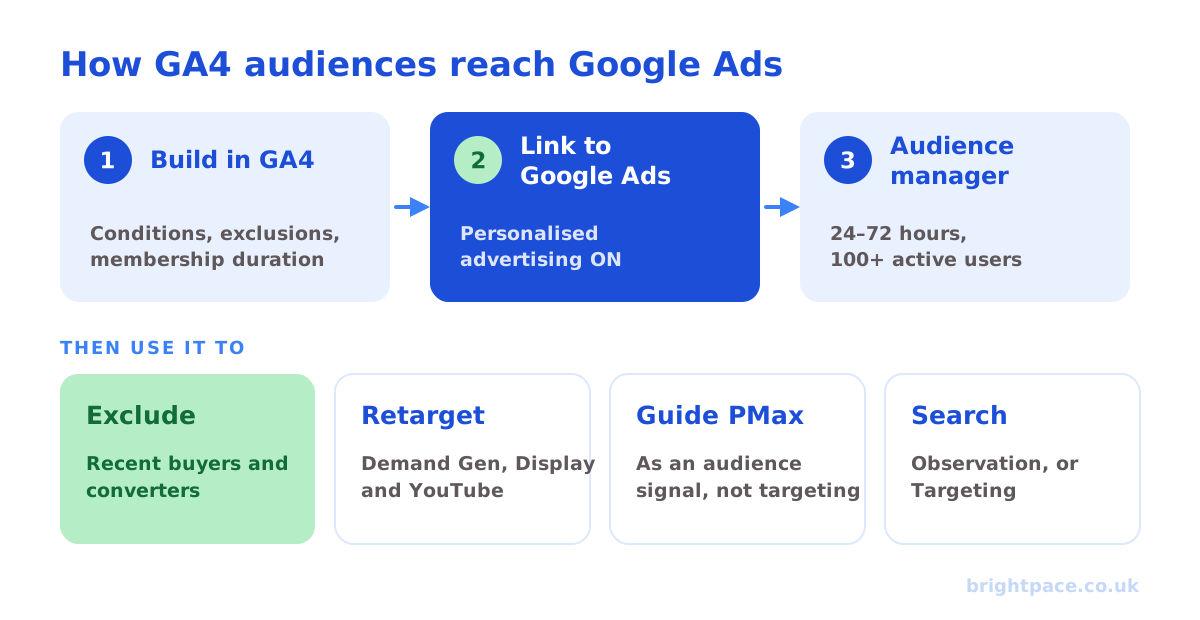
Use cases: the GA4 audiences worth building
| Goal | GA4 audience | Where to use it in Google Ads |
|---|---|---|
| Stop paying for people who just bought | Purchasers (or converters) in the last 30 days | Exclude from prospecting and retargeting |
| Recover abandoned baskets | Added to cart or began checkout, no purchase, 14 days | Demand Gen, Display and YouTube; Observation on Search |
| Steer Performance Max | High-value purchasers, engaged visitors | Audience signal in each asset group |
| Find more customers like your best | Purchasers above your average order value | Seed for Demand Gen lookalike segments |
| Nurture B2B buyers | Viewed pricing or case studies, two or more sessions, no enquiry | YouTube and Demand Gen; Observation on Search |
| Bid harder on expensive keywords | All visitors in the last 90 days | Targeting on broad, costly Search terms |
| Win back lapsed customers | Bought 6 to 18 months ago, nothing since | Demand Gen and YouTube with a return offer |
| Reach people about to buy | Predictive: likely 7-day purchasers | Performance Max signal, Demand Gen targeting |
A few notes on these:
- Exclusions pay back fastest. GA4 shares its default Purchasers audience with linked accounts automatically, so excluding recent buyers can be one of the quickest wins in the account. In Performance Max, the main way to keep spend off existing customers is the new customer acquisition goal.
- Predictive audiences need volume. GA4 only builds them once you have enough purchasers and non-purchasers in recent weeks. If the option is greyed out, your property doesn’t qualify yet.
- Lead generation works too. Swap purchases for
generate_lead: exclude people who enquired recently, and build engaged-visitor audiences for nurture. For the stages after the form, our guide to offline conversion tracking shows how to send qualified leads back to Google Ads.
Common mistakes
- Personalised advertising switched off on the link. The link looks fine, but the audiences never appear in Google Ads, or show as unusable. Check it first whenever an audience goes missing.
- Expecting history. Audiences only reach back 30 days. Build the ones you’ll need for Black Friday or a launch weeks in advance.
- Audiences too narrow to serve. Five conditions and a seven-day window can leave a list below 100 active users, so it never serves. Start broad, then split once the list is big enough.
- Targeting instead of Observation on Search. Choosing Targeting by mistake restricts a campaign to a small list and can make impressions collapse overnight.
- Treating Performance Max signals as targeting. Adding a retargeting list as a signal doesn’t make Performance Max a retargeting campaign. Judge it on new customers, not on how well it serves your list.
- Not excluding converters. Retargeting people who bought yesterday wastes budget and inflates reported results with sales that would have happened anyway.
- Comparing GA4 totals with Google Ads sizes. Consent choices, Google signals and network matching make Google Ads lists smaller. Compare with GA4’s “Advertising” segment instead.
- Leaving internal traffic in. Your own team’s visits can end up in audiences. Filter internal traffic in GA4 so tests don’t count as “engaged visitors”.
- Building audiences on sensitive topics. Google’s personalised advertising policy restricts audiences based on sensitive categories, such as health conditions. Keep conditions about behaviour on your site, not about who someone might be.
- Breaking audiences when the site changes. Rename an event or change a URL and the audience quietly stops filling. Check list sizes in Audience manager every month.
From experience
The mistake I see most is personalised advertising switched off on the GA4 to Google Ads link. Everything else is set up properly, the audiences look healthy in GA4, but they never show up in Google Ads, or show up and never serve. It's one setting, and it's the first thing I check.
FAQs
How do I share GA4 audiences with Google Ads?
Link your GA4 property to your Google Ads account in Admin → Product links → Google Ads links, with Enable personalised advertising turned on. Audiences you build in GA4 then appear in Google Ads’ Audience manager under Your data segments, usually within 24 to 72 hours.
How long do GA4 audiences take to appear in Google Ads?
GA4 usually starts populating a new audience within 24 to 48 hours, with up to 30 days of past data where available. In Google Ads, a new list can take 48 to 72 hours to fully populate.
Why isn’t my GA4 audience showing in Google Ads?
The usual causes are personalised advertising switched off on the link, the wrong Google Ads account linked, the audience still populating, or advertising not allowed for your region in GA4’s data collection settings. Check the link first.
What is the minimum audience size for Google Ads?
A list needs at least 100 active users in the last 30 days to serve on the Display Network, Search and YouTube. Below that, ads using it won’t serve.
Are GA4 audiences retroactive?
Only partly. GA4 adds up to 30 days of past data when you create an audience, where that data is available. Anything older isn’t included, so create audiences well before you need them.
Should I use GA4 audiences or Google Ads audiences?
Use Google Ads’ own lists for simple website visitor and customer lists, and GA4 audiences when you need richer conditions: engagement, event parameters, sequences or predictive audiences. Many accounts use both. Just name them clearly so nobody adds the same people twice.
Can I use GA4 audiences in Performance Max?
Yes, as audience signals in each asset group. They guide Performance Max towards the right people at the start, but it will still show ads beyond them.
In short
Link GA4 to Google Ads with personalised advertising turned on, build audiences around what people actually did on your site, give them a membership duration that matches your buying cycle, and check they reach 100 active users. Then use them where they do the most good: exclude recent converters, retarget abandoned baskets and engaged visitors, guide Performance Max with your best customers, and seed Demand Gen lookalikes. Most problems come down to the link settings, lists that are too small, or Targeting chosen where Observation was meant. For the bigger picture of how audiences fit into targeting, see our guide to first-party data and our Performance Max best practices. New to the terms? Our glossary explains them in plain English.
Sources
The platform documentation this guide is checked against. Last checked October 2026.
- Set up audiences, Google Analytics Help
- About audience segments in Audience manager, Google Ads Help
- About Google Analytics 4 audience builder, Google Ads Help
Want your audiences, tracking and campaigns set up properly? See our Google Ads management and measurement services, or start with a paid audit. Let’s chat.
Want a senior eye on your paid search?
Work directly with the founder: no juniors, no hand-offs, 30-day rolling contracts.