A Performance Max audit answers two questions in order. First, can you trust the numbers the campaign reports? Second, is the spend going somewhere that genuinely adds sales or leads? Performance Max is no longer the black box it was at launch: Google now gives you channel reporting, search terms, asset group reporting, negative keywords and brand exclusions. But most underperforming PMax campaigns still fail for the same reasons: the wrong conversion goals, spend that quietly buys your own brand and returning customers, and landing pages, assets or products that shouldn’t be getting traffic at all.
This guide walks through a Performance Max audit step by step, in the order we run it for clients, with what to check, where to find it in Google Ads and what to fix. For setting up a campaign well in the first place, see our Performance Max best practices for 2026. For the rest of the account, see our 12-point Google Ads audit checklist.
Before you start
- Get the right access. You need at least standard access to Google Ads, read access to Merchant Center if you sell products, and ideally access to GA4 and your CRM or shop platform.
- Pick a fair date range. Use the last 30 to 90 days, avoiding weeks just after big changes, when the campaign was relearning. Compare with the same period last year if your business is seasonal.
- Bring your own numbers. Have real sales, revenue, margin or qualified leads from your shop or CRM for the same period. Google’s numbers are what you’re auditing, so you need something to check them against.
The audit, step by step
1. Check what it’s optimising to
Performance Max can only chase what you tell it to, so start with the goals.
- Which conversions are primary? Open the campaign’s conversion goals. Is it using account-default goals or campaign-specific ones? Check that only real business outcomes (purchases, qualified leads, booked calls) are primary, not page views, add-to-baskets or newsletter sign-ups.
- Are values right? For eCommerce, check conversion value matches real revenue, ideally without VAT and shipping, and consider profit-based values if margins vary a lot. For lead generation, check lead stages and values come from your CRM. See our guide to Performance Max for lead generation.
- Is tracking healthy? Look for diagnostics warnings, enhanced conversions status and any gaps where Google’s conversions don’t match your shop or CRM. Our Google Ads offline conversion tracking guide covers sending CRM outcomes back.
What good looks like: primary goals that match what the business actually earns from, with Google’s reported conversions within a sensible margin of your own records.
2. Check how much is brand and returning customers
This is the most common reason Performance Max looks better than it is. It’s very good at finding people who were going to buy anyway.
- Brand searches. In the search terms report, check how much spend and conversion value comes from searches for your brand. If you run a separate brand Search campaign, add a brand exclusion to Performance Max so it can’t claim that traffic.
- Returning customers. Check whether the campaign uses the new customer acquisition goal, and if so, whether it’s set to bid higher for new customers or to only bid for them. Upload customer lists so Google can tell them apart.
- Remarketing-heavy spend. If most conversions come from people who already visited your site, results may be largely sales you’d have made anyway.
What good looks like: a clear split between brand and non-brand, and a known share of new customers. If you can’t answer “how many of these sales are new?”, that’s the first fix. To prove what PMax adds, run a lift test.
3. Read the channel performance report
Go to Campaigns → Insights and reports → Channel performance. It shows how impressions, clicks, conversions, value and cost split across Search, Shopping, YouTube, Display, Discover, Gmail, Maps and Search partners, and whether ads used product data, video or other formats.
- Where’s the money going? A retailer spending heavily on Display and YouTube with little Shopping, or a lead gen campaign with big Display spend and poor lead quality, both need a closer look.
- Check the Status column. It flags channels where the campaign isn’t eligible or is limited, often because assets such as video are missing.
- Don’t cut channels on channel ROI alone. Google optimises for the campaign as a whole, so a channel with weak reported ROI may still help. Use the report to spot problems, not to judge each channel in isolation.
The older placement report shows where ads appeared on Display and YouTube, which is useful for brand safety, but Google says not to use it to judge performance.
4. Review the search terms
Open the search terms report for the campaign (and for each asset group, where available) and sort by cost.
- Irrelevant searches. Jobs, free, DIY, competitor names you don’t want, or services you don’t offer. Add them as campaign-level negative keywords (up to 10,000 per campaign) or through shared negative keyword lists.
- Your own brand. As in step 2, if brand terms are taking spend and you have a brand campaign, use a brand exclusion.
- Overlap with Search. If valuable searches keep showing up in PMax, check that your Search campaigns cover them with exact or phrase match keywords. Search campaigns with keywords that match the search generally take priority.
5. Check where it sends people: final URL expansion
Final URL expansion is on by default. It lets Google send people to whichever page on your site it thinks fits the search, and it can create ad text from that page.
- See which pages got traffic. Check the landing pages report for PMax. Look for blog posts, careers pages, policy pages, out-of-stock products or pages that rarely convert.
- Exclude or switch off. Add URL exclusions for pages that shouldn’t get paid traffic, or turn final URL expansion off if the campaign should only send people to specific pages. For lead generation, sending people only to your best-converting landing pages is often safer.
6. Audit asset groups and their structure
- Are asset groups built around real themes? Each should match a product category, service or audience with its own message and landing page, not just “Asset group 1”.
- How is each one performing? Use asset group reporting to compare spend, conversions and value. Asset groups that never get spend, or that spend without converting, need fixing or pausing.
- Too many or too few? Lots of small asset groups split budget and data; one asset group for everything gives Google no themes to work with.
See our guide to structuring campaigns for automation for how to group them.
7. Audit the assets
- Coverage. Check every asset group has the full set: headlines, long headlines, descriptions, landscape, square and portrait images, logos and, crucially, your own video. Without video, Google can create one automatically from your images, which rarely looks good.
- Asset performance. Review which assets get impressions and which are rated low. Replace low performers with genuinely different ideas, not small rewrites.
- Accuracy. Check auto-created assets and text generated from your website don’t promise anything you don’t offer, such as old prices, ended offers or services you’ve stopped.
8. Check audience signals and search themes
Audience signals and search themes are hints, not targeting, but bad hints slow learning.
- Are signals your best data? Customer lists, converters, high-value segments and your own website visitors beat broad interest audiences. You can sync GA4 audiences to Google Ads to use them.
- Do search themes fit? Check they describe what you sell and match the asset group’s products or services.
9. Audit the product feed (retailers)
For eCommerce, the feed is the campaign. In Merchant Center and the PMax product reports, check:
- Feed health. Disapproved products, missing GTINs, weak titles and images, wrong prices or availability.
- Listing groups. Which products each asset group includes, and whether bestsellers, low-margin items and clearance stock are grouped sensibly.
- Products that never get impressions. Large numbers of “zombie” products may need better titles or their own campaign.
- Products that spend without selling. Exclude or regroup them.
Our guides to Performance Max vs Standard Shopping and Google Shopping for Shopify stores cover feed and campaign choices.
10. Check bidding, budget and learning
- Does the target match your economics? A target ROAS or target CPA should come from your margins and what a customer is worth, not a round number. Our ROAS calculator shows break-even.
- Is it limited by budget or by target? If it’s limited by budget but hitting target, it may deserve more. If it’s missing target, a lower budget won’t fix it.
- How often is it changed? Frequent big changes to targets, budgets or assets keep it relearning. Look in change history for changes made every few days.
11. Check overlap with your other campaigns
- Shopping and Search. Check how PMax, Standard Shopping and Search campaigns share products and searches, and that each has a clear job.
- AI Max. If you also run AI Max for Search, plan the two together, because both reach beyond your keywords. See our guide to Google AI Max.
- Several PMax campaigns. Make sure they don’t target the same products or audiences without a reason.
12. Check settings and brand safety
- Location. Check it targets people in your locations, not people “interested in” them, unless that’s deliberate.
- Language, schedule and device. Check they match where and when you can serve customers. Device and age controls are available but should be used only where data clearly justifies them.
- Brand safety. Add account-level placement exclusions for sites, apps and YouTube content you don’t want ads near.
How to prioritise what you find
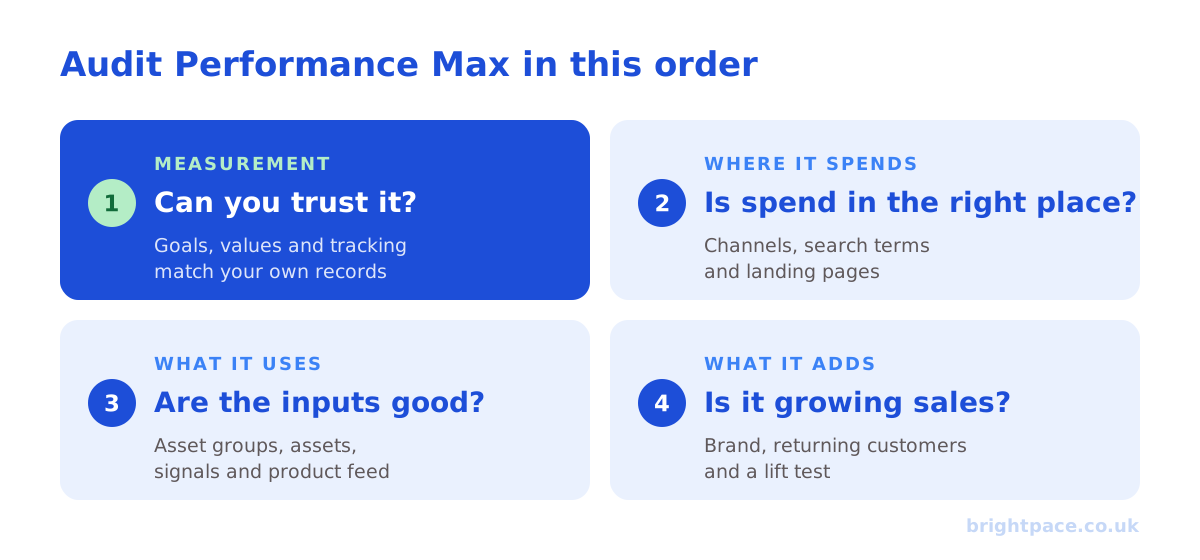
Fix problems in this order:
- Measurement first. Wrong primary goals, missing values or broken tracking make every other number unreliable.
- Then where it spends. Brand capture, irrelevant search terms, bad landing pages and channels with missing assets.
- Then what it uses. Asset groups, assets, signals and the product feed.
- Then whether it adds sales. Once the campaign is clean, test what it genuinely adds with a geo or holdout lift test, and judge it on blended results such as MER alongside Google’s numbers.
Performance Max audit checklist
| Area | Check | Where to find it |
|---|---|---|
| Goals | Only real outcomes are primary; values match revenue or lead value | Campaign settings → Conversion goals |
| Tracking | Diagnostics clear; Google’s conversions close to your own records | Diagnostics, Goals summary, your shop or CRM |
| Brand | Brand share known; brand exclusion if you run a brand campaign | Search terms report, campaign settings |
| New customers | Customer lists uploaded; new customer goal set if acquisition matters | Customer acquisition settings, Audience manager |
| Channels | Spend split makes sense; no channels limited by missing assets | Insights and reports → Channel performance |
| Search terms | Irrelevant searches excluded with negatives | Search terms report |
| Landing pages | No paid traffic to blog, careers or low-converting pages | Landing pages report, URL exclusions |
| Asset groups | Built around real themes; none spending without converting | Asset group reporting |
| Assets | Full set including your own video; low performers replaced | Asset reporting, ad strength |
| Signals | Customer lists and converters used; search themes fit | Asset group signals |
| Feed | No disapprovals; sensible listing groups; zombie products handled | Merchant Center, product reports |
| Bidding | Target set from margins; not changed every few days | Campaign settings, change history |
| Overlap | Clear job for each PMax, Shopping, Search and AI Max campaign | Search terms, auction insights |
| Settings | Location presence, schedule and brand safety exclusions right | Campaign and account settings |
Common mistakes
- Trusting reported ROAS without checking brand and returning customers. The single most expensive mistake.
- Optimising to micro-conversions. Add-to-baskets and page views as primary goals teach PMax to find browsers, not buyers.
- Leaving final URL expansion unchecked. It can send paid traffic to pages that never convert.
- Running without your own video. Auto-generated video rarely represents a brand well.
- Judging each channel alone. Cutting a channel on reported ROI can hurt the whole campaign.
- Changing it constantly. Frequent changes keep it relearning and make results impossible to read.
Frequently asked questions
How often should you audit a Performance Max campaign?
Do a full audit when you take over an account, after big changes, and at least every quarter. Check search terms, landing pages and channel spend weekly or every two weeks, because new searches and pages appear all the time.
Can you see search terms in Performance Max?
Yes. Performance Max has a search terms report showing which searches triggered your ads, and you can add negative keywords at campaign level or through shared lists. It’s one of the most useful parts of a PMax audit.
Can you see which channels Performance Max spends on?
Yes. The channel performance report under Insights and reports shows how impressions, clicks, conversions, value and cost split across Search, Shopping, YouTube, Display, Discover, Gmail, Maps and Search partners. Google advises judging the campaign as a whole rather than cutting channels on their own reported ROI.
Why does Performance Max have a high ROAS but sales haven’t grown?
Usually because it’s capturing brand searches and returning customers who would have bought anyway. Check the brand share in search terms, use brand exclusions and the new customer goal, and run a lift test to measure what it genuinely adds.
Should I turn off final URL expansion?
Not always. It can find relevant pages you hadn’t thought of, which helps retailers with large sites. But check the landing pages report, exclude pages that shouldn’t get paid traffic, and turn it off when you need tight control, which is common in lead generation.
Can I get a Performance Max audit done for me?
Yes. A paid PPC audit from Brightpace covers Performance Max alongside the rest of your Google Ads account, with a prioritised list of fixes. You keep the findings whether or not you work with us.
In short
Audit Performance Max in four layers, in order: measurement, where it spends, what it uses and whether it adds sales. Start with conversion goals, values and tracking; then check brand and returning-customer capture, the channel performance report, search terms and landing pages; then asset groups, assets, signals and the product feed; and finally prove what it adds with a lift test and blended results. Fix measurement first, because nothing else in the audit means much until the numbers are right.
Sources
The Google Ads documentation this guide is checked against. Last checked October 2026.
- About Performance Max campaigns, Google Ads Help
- About the channel performance report for Performance Max, Google Ads Help
- Access new inventory and channel performance reporting in Performance Max campaigns, Google Ads Help
- Find or create placement reports for your Performance Max campaigns, Google Ads Help
- About Final URL expansion in Performance Max, Google Ads Help
- About URL exclusion in Performance Max, Google Ads Help
- About brand exclusions, Google Ads Help
- About customer lifecycle goals (new customer acquisition), Google Ads Help
- Performance Max reporting, Google Ads API
- Google raises negative keywords limit to 10,000 for Performance Max campaigns, PPC Land
Want a second pair of eyes on your Performance Max? Book a paid media audit, see how we run Google Shopping & Performance Max, or let’s chat about your account.
Want a senior eye on your paid search?
Work directly with the founder: no juniors, no hand-offs, 30-day rolling contracts.