Performance Max can work well for lead generation, but only if you teach it what a good lead looks like. Left to optimise to raw form fills, it will find the cheapest form fills it can, and many of those won’t be real prospects. Set up properly, bidding to qualified leads, feeding lead quality back to Google, filtering spam before it counts and judging results on cost per customer, it can add leads your Search campaigns would never reach.
This guide is for lead generation businesses: B2B, professional services such as law firms, dental practices, trades and anyone whose “conversion” is an enquiry rather than a sale. For the general set-up, see our Performance Max best practices; this post covers what’s different when the goal is leads.
Is Performance Max right for lead generation?
Performance Max (PMax) runs one campaign across Search, YouTube, Display, Discover, Gmail and Maps. For lead gen, that reach is both the opportunity and the risk: it can find people before they search, but much of that inventory makes it easy to generate cheap, low-intent form fills.
It’s usually worth testing when:
- Your Search campaigns already cover your core keywords and you’re looking for extra volume, not a replacement.
- You can tell good leads from bad ones: in your CRM, a spreadsheet or by phone, and send that back to Google.
- You have enough conversions to learn from. Google recommends at least 15 conversions in the last 30 days, at account level, for the conversion action you bid to.
- Your budget can absorb a learning period of several weeks without starving your best Search campaigns.
Hold off if you only track form submissions, can’t qualify leads, or get a handful of enquiries a month. In that case, tighter Search campaigns and better conversion tracking will do more for you first.
Why Performance Max sends junk leads
Performance Max optimises to whatever you tell it counts as a conversion. If every form submission counts equally, it has no reason to prefer a decision-maker with a real project over a student, a competitor, a job seeker or a bot. It will simply find the cheapest submissions, and cheap submissions often come from placements and audiences where people tap ads by accident, autofill forms without reading them, or don’t exist at all.
The fix isn’t usually a setting inside the campaign. It’s the signal you give it: what you count, what you value, and what you filter out before Google ever sees it.
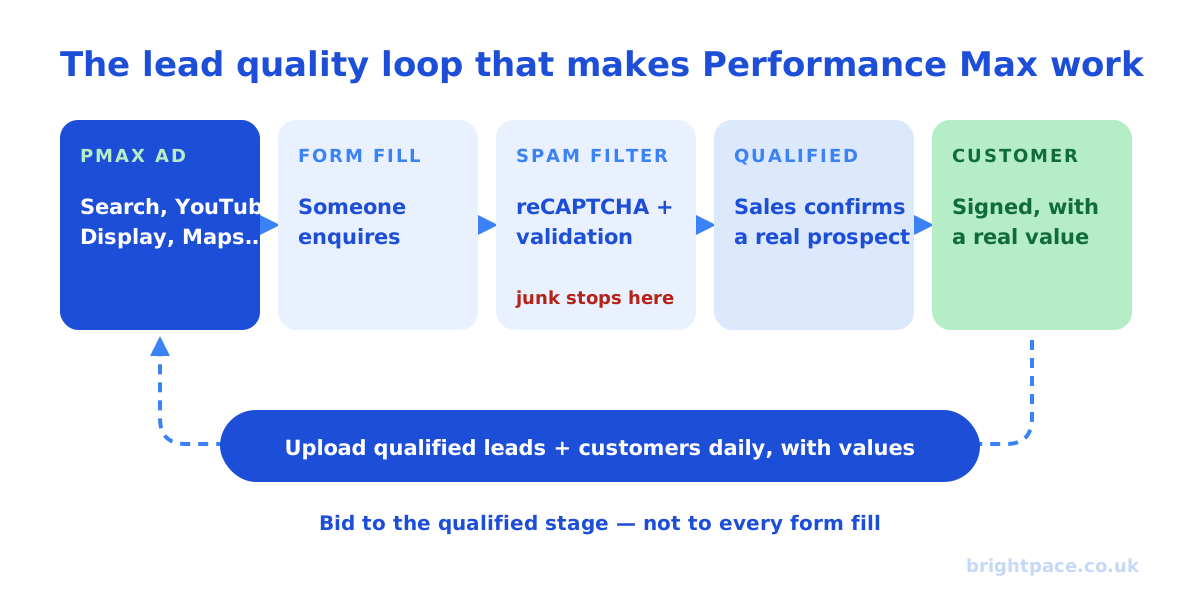
1. Bid to qualified leads, not form fills
Map your lead journey first: form submitted → qualified → meeting or quote → customer. Create a separate conversion action for each stage, then pick one to bid to. Google advises against optimising to goals from several stages at once, because it double-counts the same lead.
- Bid to the deepest stage you have enough volume for: ideally a qualified lead, if you get roughly 15 or more a month.
- Keep the other stages as secondary (observation only), so you can still see them in reports without them steering bids.
- Use Google’s lead-specific goal categories, such as “Qualified lead” or “Request quote”, rather than a generic “Submit lead form” for everything. Google says lead-specific goals switch on invalid traffic protections built for lead generation.
- Prefer a stage that usually happens within about seven days of the click. If your sales cycle is months long, bid to qualification (which happens fast), not to closed deals.
2. Send lead quality back to Google
This is the step that makes Performance Max useful for lead gen. When you send qualified leads and customers back to Google, it learns which clicks turn into business and finds more people like them.
- Use enhanced conversions for leads. It matches leads using hashed first-party data such as email address, and Google now recommends it over click-ID-only offline imports. Keep capturing the click ID (GCLID) as well: Google still recommends sending it.
- Upload daily. Google recommends regular uploads, ideally every day, so bidding reacts to fresh data.
- Include phone leads. If many enquiries arrive by phone, qualify those calls too: see Google Ads call tracking.
- Don’t upload spam or duplicates. Whatever you import becomes the target. Clean the list first.
Our B2B offline conversion tracking guide walks through the set-up step by step, including which stage to optimise to.
3. Bid on value when leads aren’t equal
If some leads are worth far more than others, a large B2B account versus a small one, or a complex legal case versus a quick enquiry, give them different values and use value-based bidding (Maximise conversion value, with a target ROAS once you have the data). Conversion value rules can then adjust values by location, device or audience.
If you can’t value leads differently, bid with a target CPA on qualified leads. Work out what you can afford per qualified lead from your close rate and customer value: our CPA calculator and LTV:CAC calculator help.
4. Stop spam at the form
Spam you block at the form never reaches Google’s learning. Google’s own lead quality guidance recommends verification such as reCAPTCHA, double opt-in or server-side validation.
- Add reCAPTCHA (or an equivalent) and a hidden honeypot field to every lead form.
- Validate on the server: reject obviously fake emails, phone numbers and repeat submissions.
- Only fire the conversion tag on a genuine, validated submission, not on a button click or page load.
- Ask one qualifying question where it matters: budget, service needed or location. It costs a little volume and saves a lot of wasted follow-up.
Lead form assets let people submit their details without leaving Google. They can lower friction, but they also make it easier to submit without much thought. If you use them, add qualifying questions and make sure the leads flow into the same qualification and upload process as your website forms.
5. Steer where it runs
Performance Max now has far more controls than at launch. For lead generation, the most useful are:
- Brand exclusions: run your brand terms in a separate Search campaign so PMax can’t claim leads you’d have won anyway.
- Negative keywords: campaign-level negatives keep it off searches for jobs, training, free templates and DIY.
- Data exclusions: exclude Customer Match lists, website visitor lists or Google Analytics audiences, such as existing clients or people who’ve already enquired, so you’re not paying to reach them again.
- New customer acquisition goal: upload your customer list and choose “Bid higher for new customers”. Google warns that “Only bid for new customers” can limit reach.
- URL controls: if final URL expansion is on, exclude blog posts, careers and other pages that shouldn’t receive lead gen traffic, or use a page feed of the landing pages you want.
- Ad schedule: Google itself suggests running ads when you’re available to handle enquiries. For phone-led businesses, that matters.
- Placement, age and gender exclusions: use them for brand safety or where your data clearly justifies it, not as a guess.
6. Give it the right assets and signals
- One asset group per service or audience, with landing pages and copy that match. A “commercial property law” asset group shouldn’t share assets with “family law”.
- Search themes tell PMax which searches each asset group is relevant to.
- Audience signals: your customer list is the strongest one. Website visitors and custom segments built from competitor or category searches help too.
- Upload your own video. Without one, Google may generate a video from your images, which rarely represents a professional service well.
- Add call assets if you want phone enquiries, and make sure those calls are tracked.
7. Judge it on cost per customer, not cost per lead
Performance Max will almost always report a lower cost per lead than Search. That number means little until you compare what happens next.
- Compare cost per qualified lead and cost per customer between PMax and Search, over at least 60 days.
- Check the channel performance report. If most spend goes to Display or Discover and those leads rarely qualify, tighten the conversion goal and assets before you blame the campaign.
- Read the search terms report weekly and add negatives.
- Test properly. Where volume allows, run a Google Ads experiment, or a holdout, to see what PMax genuinely adds: see our guide to lift tests.
Worked example
An illustrative example, not a client result. A B2B services firm spends £3,000 a month on Performance Max. Its sales team says roughly one in six qualified leads becomes a client.
| Bidding to form fills | Bidding to qualified leads | |
|---|---|---|
| Leads | 100 | 60 |
| Cost per lead | £30 | £50 |
| Qualified (sales-accepted) | 18 (18%) | 30 (50%) |
| Cost per qualified lead | £167 | £100 |
| Clients (1 in 6 qualified) | 3 | 5 |
| Cost per client | £1,000 | £600 |
On a cost-per-lead basis, the first campaign looks better. On the number that matters, cost per client, the second wins clearly. That’s why the conversion you bid to matters more than any setting inside the campaign.
Performance Max lead gen checklist
- Separate conversion actions for each lead stage; bid to one
- Lead-specific goal categories (“Qualified lead”, “Request quote”)
- Enhanced conversions for leads, with GCLID captured, uploaded daily
- Spam blocked at the form, conversions only on validated submissions
- Values or a target CPA based on what a qualified lead is worth
- Brand exclusions plus a separate brand Search campaign
- Negatives, data exclusions and URL controls in place
- One asset group per service, with your own video
- Judged on cost per qualified lead and cost per customer
Common mistakes
- Bidding to every form fill. The fastest route to cheap, useless leads.
- Counting several stages as primary. Google double-counts the same lead and bids badly.
- Importing spam. If junk leads go back to Google as conversions, you’re training it to find more.
- Letting PMax take brand traffic. It inflates results with leads you’d have won anyway.
- Judging it on cost per lead. The cheapest leads are often the least valuable.
- Switching it off too early, or never checking. Give it several weeks, then compare against Search on business results.
FAQs
Is Performance Max good for lead generation?
It can be, if you bid to qualified leads, send lead quality back to Google and block spam. If you only track raw form fills, it tends to deliver cheap leads that rarely convert. Most lead gen businesses should get Search and tracking right first, then test PMax for extra volume.
Why is Performance Max sending spam leads?
Usually because it’s optimising to every form submission, so it finds the cheapest ones, including bots, accidental taps and autofilled forms. Add reCAPTCHA and server-side validation, only count genuine submissions, and bid to qualified leads you send back from your CRM.
How many conversions does Performance Max need for lead generation?
Google recommends at least 15 conversions in the last 30 days, at account level, for the conversion action you bid to. If you get fewer qualified leads than that, bid to an earlier stage that still reflects quality, or stick with Search until volume grows.
Should I use lead form assets in Performance Max?
They can raise volume by letting people enquire without leaving Google, but quality can drop. If you use them, add qualifying questions and send those leads through the same qualification and upload process as your website leads.
Should I run Performance Max alongside Search for lead generation?
Usually, yes. Search campaigns with keywords matching the search generally take priority, so keep your core and brand terms in Search and use PMax to find extra demand. Compare both on cost per qualified lead and cost per customer, not cost per lead.
In short
Performance Max isn’t bad at lead generation: it’s very good at finding whatever you tell it to find. Tell it to find form fills and it will find cheap ones. Tell it to find qualified leads and customers, by sending that data back, blocking spam and valuing leads properly, and it can become a useful source of extra pipeline alongside Search.
Sources
The platform documentation and coverage this guide is checked against. Last checked October 2026.
- Best practices for generating high-quality leads, Google Ads Help
- About Performance Max campaigns, Google Ads Help
- Performance Max campaign settings, Google Ads Help
- About customer lifecycle goals (new customer acquisition), Google Ads Help
- Troubleshooting the new customer acquisition goal, Google Ads Help
- Configure the Google tag for enhanced conversions for leads, Google Ads Help
Want Performance Max bringing in customers, not just leads? See our PPC management and B2B paid media, book a paid media audit, or let’s chat.
Want a senior eye on your paid search?
Work directly with the founder: no juniors, no hand-offs, 30-day rolling contracts.