Google Ads call tracking shows which ads, keywords and campaigns make your phone ring: and, set up properly, which of those calls turn into customers. For businesses that win most of their work by phone, such as law firms, dental practices, trades and high-value B2B services, it’s often the difference between bidding on guesswork and bidding on revenue. Without it, Google can see the clicks but not the calls, so it learns from a fraction of your results.
This guide covers the ways to track calls in Google Ads, how to set each one up, the businesses that benefit most, and how to feed qualified calls back to Google as offline conversions so bidding chases callers who actually buy.
Why call tracking matters
If a large share of your enquiries arrive by phone, a Google Ads account that only tracks forms is flying half blind:
- Smart Bidding can’t optimise what it can’t see. It will favour keywords that bring form fills, even if the keywords bringing calls are the ones that make you money.
- You can’t judge campaigns fairly. A campaign that looks expensive on forms may be your best source of phone bookings.
- You can’t tell good calls from bad. A two-minute call from an existing customer and a 20-minute call that becomes a £5,000 client look the same unless you measure what happened next.
The ways to track calls in Google Ads
Google offers four built-in call conversion types, and third-party call tracking adds more.
- Calls from ads. Calls made straight from a call asset or call-only ad. Google shows a forwarding number in the ad and counts a conversion when the call lasts longer than your minimum length.
- Calls to a number on your website. The Google tag swaps the phone number on your site for a Google forwarding number for people who arrived from an ad, so calls made after browsing the site are tied back to the click.
- Clicks on your number on a mobile site. Counts taps on a
tel:link. It measures intent, not actual calls, some taps never become calls, so treat it as a secondary signal. - Imported call conversions. You upload the outcome of calls that came through a Google forwarding number, a booked appointment or a signed client, matched by the caller’s number and the call start time.
Third-party call tracking (tools such as CallRail, Mediahawk, ResponseTap or Infinity) works across every channel, not just Google. It shows a different number to each visitor, records which ad click, the gclid, and which page brought each call, and adds recordings, transcripts and call scoring. Most can send conversions straight to Google Ads and GA4.
How to set it up
Google’s built-in tracking
- Turn on call reporting. In your Google Ads account settings, make sure call reporting is on, so Google uses forwarding numbers and records call details. In the UK, Google tries to give you a forwarding number with your local area code; forwarding numbers work on Search, not on the Display Network.
- Add call assets to your search campaigns with your main number, scheduled to the hours someone can answer.
- Create a “Calls from ads” conversion action (Goals → Conversions → New conversion action → Phone calls) and set the minimum call length: the shortest call you’ll count. 60 seconds is the usual starting point (and widely cited as Google’s default); shorten it if a booking takes 30 seconds, or lengthen it for considered services where a real enquiry takes several minutes.
- Create a “Calls to a phone number on your website” conversion action and add the snippet Google gives you to your site, usually through Google Tag Manager. It replaces your displayed number for people who arrived from an ad.
- Choose counting and values. Count one conversion per click for lead generation, and give each call a value that reflects what a call is typically worth to you.
- Decide what’s primary. Mark the call actions that should drive bidding as primary and the rest, such as clicks on your number, as secondary, so the same enquiry isn’t counted twice.
Third-party call tracking
- Pick a tool that suits UK callers. Use local geographic numbers (020 for London, 0161 for Manchester and so on) so the number on your site looks familiar and costs callers the same as any local call.
- Install its script on your site, usually through Google Tag Manager, and set up a number pool large enough to give each visitor their own number during busy times.
- Connect it to Google Ads and GA4, and choose what counts: answered calls, calls over a set length, or calls you mark as qualified.
- Switch off Google’s own call conversions for the same calls if the tool sends its own, so nothing is counted twice.
- Tell callers they may be recorded. If you record calls, a short message at the start of the call and a line in your privacy policy keep you on the right side of UK data protection rules.
Who benefits most
Call tracking earns its keep wherever phone calls are a big share of enquiries and each customer is valuable:
- Law firms: family, personal injury, conveyancing and criminal enquiries often start with a call, and one instructed case can be worth thousands.
- Dental practices: new-patient bookings, implants and aligner consultations.
- Trades and home services: emergency plumbers, locksmiths and roofers, where people phone rather than fill in a form.
- B2B and professional services: high-value enquiries where a call is the first sales conversation.
- Travel and hospitality: group bookings, tailor-made trips and event enquiries made by phone.
- High-ticket eCommerce: buyers who phone before ordering furniture, cars or equipment.
Using calls as offline conversions
Counting every call over 60 seconds is a good start, but it treats a wrong number, an existing customer and a new client the same. The step that changes results is telling Google which calls became business: the same idea as offline conversion tracking for forms.
There are three ways to do it:
- Google’s call conversion import. For calls through Google forwarding numbers, upload the outcome with the caller’s phone number and call start time (from your phone system or CRM), whether the caller consented to ad measurement, the conversion name, time and value. Google matches it to the call and the click; imported results can take up to three hours to appear.
- Third-party tool with the gclid. Most call tracking tools store the gclid for each call. Mark the call as qualified or won, in the tool or your CRM, and send it to Google Ads as an offline conversion, directly or via a scheduled upload.
- Enhanced conversions for leads. If you capture the caller’s phone number or email when they book, Google can match a hashed version of it to the ad click: a useful backstop when there’s no click ID.
Set it up in stages, like a sales funnel: qualified call, then booked or proposal, then won, each with its own value. Start with them as secondary actions for reporting, then make qualified calls your primary goal once you have enough volume, roughly 15–30 a month, for Smart Bidding to learn from. Work out a sensible target with our CPA calculator.
Worked example
A London family law firm (illustrative figures) spends £4,000 a month on Google Ads:
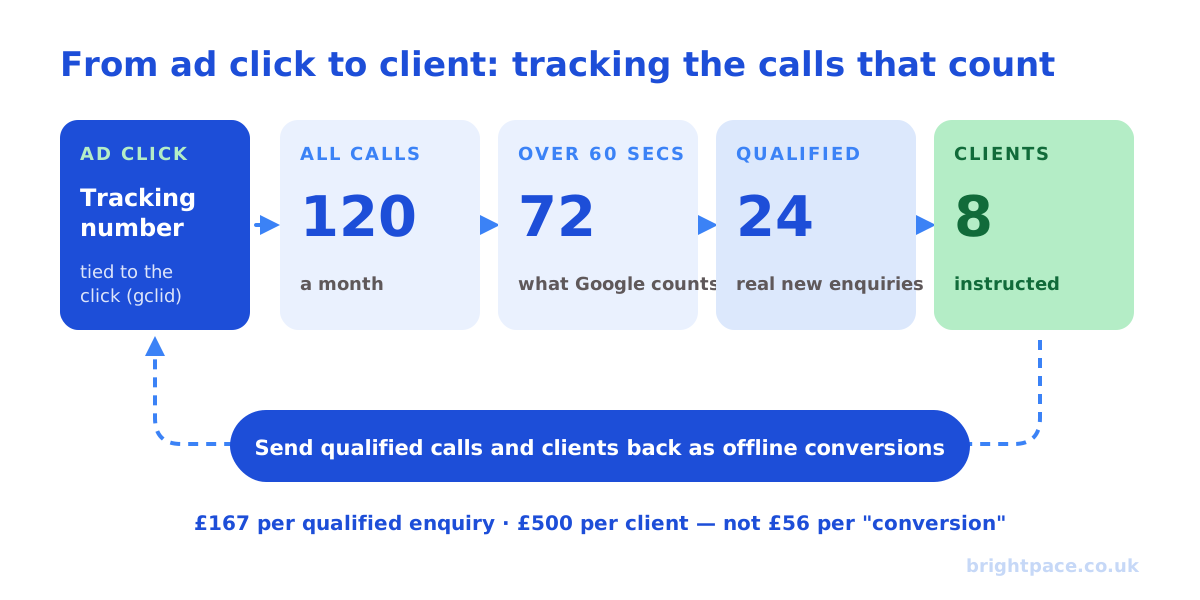
- 120 calls a month come from ads; 72 last over 60 seconds and count as conversions: a cost per conversion of about £56.
- Reviewing the calls shows only 24 are genuine new enquiries; the rest are existing clients, other law firms and people looking for legal aid the firm doesn’t offer. 8 become instructed clients.
- Bidding on all 72 calls teaches Google to find more of the wrong callers. Uploading the 24 qualified calls (and the 8 clients, with their fee value) shows the true cost: about £167 per qualified enquiry and £500 per client, and lets bidding find more of them.
- The firm also learns that “free legal advice” searches bring long calls but no clients, and adds them as negative keywords.
Common mistakes
- Counting taps on your number as calls: inflates results, since many taps never connect.
- Counting the same call twice: Google call conversions and a third-party tool both reporting it.
- Too short a minimum call length: wrong numbers and quick questions count as leads.
- Tracking your customer service line: existing customers ringing about their account aren’t new business.
- Running call assets when nobody answers: schedule them to your opening hours.
- Not telling callers about recording: a legal risk and an easy fix.
- Stopping at “call over 60 seconds”: the real gains come from sending back which calls became customers.
Running ads for trades? Our guide to Local Services Ads in the UK covers pay-per-lead listings that work alongside call-tracked search ads.
FAQs
How does Google Ads track phone calls?
Google uses forwarding numbers: a unique number shown in your ads or swapped onto your website for people who clicked an ad. When someone calls it, Google connects them to your real number and records the call, so it can be tied to the ad, keyword and click.
What is a good minimum call length for a Google Ads conversion?
60 seconds is the usual starting point, and it’s widely cited as Google’s default, but it’s a setting you choose. Use your own call data: if a booking takes 30 seconds, shorten it; if a genuine enquiry for your service usually takes several minutes, lengthen it so quick questions and wrong numbers don’t count as leads.
Do I need third-party call tracking software?
Not always. Google’s built-in tracking covers calls from ads and from your website for free. A third-party tool adds tracking across every channel, call recordings, transcripts, call scoring and easier offline conversion uploads: worth it when calls are a big share of your enquiries.
Can I import phone call conversions into Google Ads?
Yes. You can import call outcomes for calls made through Google forwarding numbers using the caller’s number and call start time, or send qualified calls from a third-party tool using the click ID (gclid). Both let Google learn which calls became customers.
Is it legal to record calls in the UK?
Businesses can record calls, but callers should be told, usually with a short message at the start of the call, and your privacy policy should explain why you record, how long you keep recordings and who can access them.
Will call tracking numbers hurt my local SEO?
Not if you’re careful. Keep your main number consistent across your website and listings, and if you use a tracking number on your Google Business Profile, keep your main number as an additional number.
In short
Call tracking lets Google Ads see the enquiries that arrive by phone. Start with Google’s built-in call conversions, calls from ads and calls from your website, with a sensible minimum call length, and add a third-party tool if calls are a big part of your business. Then go further: send back which calls became qualified enquiries and clients as offline conversions, so bidding learns to find callers who buy, not just callers who talk for a minute.
Sources
The platform documentation and coverage this guide is checked against. Last checked October 2026.
- Tracking calls to a phone number on a website, Google Ads Help
- About call assets, Google Ads Help
- Offline conversion imports FAQs, Google Ads Help
Want calls measured properly? We set up call tracking as an optional add-on to our PPC management, the software cost plus a small management charge, quoted up front, and connect it to your measurement. Let’s chat.
Want a senior eye on your paid search?
Work directly with the founder: no juniors, no hand-offs, 30-day rolling contracts.