Performance Max (PMax) is Google’s goal-based campaign type that uses AI to run your ads across all of Google’s inventory, Search, Shopping, YouTube, Display, Discover, Gmail and Maps, from a single campaign. You provide goals, budgets, assets and signals; Google decides where, when and to whom to show your ads.
When it launched, Performance Max was famously a black box. That’s no longer true. Google has since added search terms reporting, campaign-level negative keywords, channel reporting, brand and URL controls and much more, which means “set it and forget it” is no longer an acceptable way to run it. Here are the best practices we follow in 2026.
1. Get measurement right first
Performance Max optimises relentlessly toward whatever you tell it is a conversion. If that signal is wrong, it will scale the wrong thing very efficiently.
- Use the right primary conversions: purchases or qualified leads, not page views or soft micro-conversions.
- Pass accurate values. For eCommerce, revenue: ideally margin-aware. For lead generation, values that reflect lead quality.
- Switch on enhanced conversions and, for lead generation, import offline conversions so PMax learns which leads become customers. See our guide to Performance Max for lead generation.
If you’re not sure your tracking is sound, fix it before anything else: it’s the first thing a paid media audit checks.
2. Choose goals and bidding that match your economics
- eCommerce: bid to conversion value with a target ROAS set from your margins, not a platform benchmark. Work out your break-even with our ROAS calculator and read what a good ROAS actually is.
- Lead generation: bid to conversions or conversion value with a target CPA you can afford, check it with our CPA calculator.
- Growth: use the new customer acquisition goal to value new customers more highly (or bid for new customers only), and use Google’s new customer acquisition cost reporting to see what growth actually costs.
3. Structure asset groups around real themes
One giant asset group makes it hard to steer anything or learn from results. Instead:
- Group by theme: product category, service line or audience intent, so each asset group has relevant creative, landing pages and signals.
- For retailers, segment the feed. Use custom labels for margin, bestsellers and price band so budget can flow to the products that make money. See our eCommerce approach.
- Keep brand and non-brand thinking separate, so brand demand doesn’t flatter PMax results (more on that below).
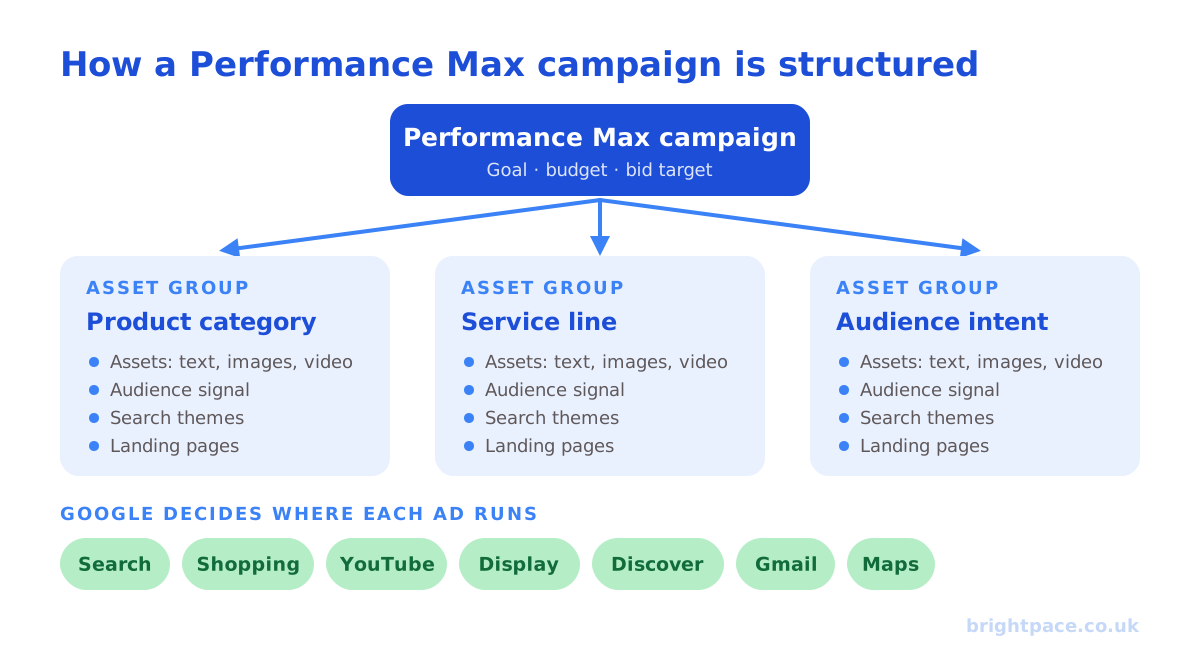
Our guide to structuring campaigns for automation covers the principles in more depth.
4. Use audience signals and search themes as hints
Audience signals in Performance Max are suggestions, not targeting. They help the system start in the right place; it will still go beyond them.
- Lead with first-party data: customer lists and website visitors are your strongest signals (how to build and use them). GA4 audiences, such as high-value purchasers, work as signals too: see how to sync GA4 audiences to Google Ads.
- Add search themes to tell Google which searches matter. You can now add up to 50 search themes per asset group.
- Don’t over-engineer signals and then judge PMax as if it only showed ads to those people.
5. Use every control you now have
This is the biggest change from early Performance Max. Use the steering Google has added:
- Negative keywords: campaign-level negatives (up to 10,000 per campaign) and shared negative keyword lists keep PMax off irrelevant or unprofitable searches.
- Brand exclusions: stop PMax bidding on your own brand if a separate brand campaign handles it. Retailers can apply brand exclusions to Search text ads only, keeping branded Shopping traffic.
- URL exclusions: if final URL expansion is on, exclude pages that shouldn’t get paid traffic, such as blog posts, careers or low-converting pages.
- Placement exclusions: protect brand safety across YouTube and Display.
- Device and age controls: now available, but use them only where the data clearly justifies it; over-restricting starves the system.
- Customer list exclusions: keep acquisition campaigns focused on new customers rather than re-buying existing ones.
6. Give it a complete, high-quality asset set
PMax can only be as good as the creative you give it:
- Fill every asset type: multiple headlines, long headlines and descriptions, and images in landscape, square and portrait formats.
- Supply your own video. If you don’t, Google may generate video from your images: rarely as good as something made for the purpose.
- Make assets genuinely different: different angles, benefits and proof points, not near-duplicates. The same principle drives Meta’s Andromeda.
- Refresh based on asset reporting. Full asset performance reporting now shows conversions and cost by asset, so replace what isn’t working. Our creative-testing framework helps here.
7. Give it budget and time
- Budget for learning. Performance Max needs enough conversions to learn: a budget spread too thin across many campaigns will struggle.
- Avoid constant changes. Frequent edits to targets, budgets and assets reset learning. Make deliberate changes and let them settle.
- Start sensibly. Many accounts begin with conversion-focused bidding to build volume, then add a ROAS or CPA target once data is established.
8. Read the new reporting: weekly
The reporting Google has added is only useful if you act on it:
- Search terms report: see which searches triggered your ads, including whether they came from keywordless matching or your search themes. Add negatives accordingly.
- Channel performance reporting: see how spend and results split across Search, Shopping, YouTube, Display and the rest.
- Asset and audience reporting: see which creative and which audiences are driving results.
- Diagnostics: Google now flags goal and tracking issues directly. Don’t ignore them.
9. Prevent cannibalisation
Performance Max can look brilliant simply by capturing demand you’d have won anyway, especially brand searches and returning customers.
- Use brand exclusions and a separate brand campaign.
- Keep well-performing Search campaigns running; Search campaigns with keywords that match the search generally take priority over PMax.
- Use customer list exclusions or the new customer goal if acquisition is the aim.
- If you’re also rolling out AI Max, plan the two together: see our guide to Google AI Max.
10. Judge it on business results
Google reports its own success generously. Judge Performance Max on what it adds to the business:
- Blended revenue and profit, not PMax’s reported ROAS alone
- New customers acquired and their cost
- Incremental impact: what happened to total results when PMax was scaled, paused or restructured. Since October 2026, Google lets many advertisers run self-serve Conversion Lift studies on Performance Max, so you can measure this directly: see our guide to lift tests
It’s the principle behind commercial alignment over channel metrics.
Performance Max checklist
- Accurate primary conversions, values and enhanced conversions
- Goals and targets set from your margins or lead value
- Asset groups built around real themes; feed segmented by custom labels
- First-party audience signals and search themes added
- Negative keywords, brand, URL and placement exclusions in place
- A complete asset set, including your own video
- Enough budget and time to learn; no constant tinkering
- Search terms, channel, asset and audience reports reviewed weekly
- Brand and existing customers protected from cannibalisation
- Results judged on blended profit and new customers
Common mistakes
- Launching PMax on weak or inflated conversion tracking
- One asset group for everything
- Treating audience signals as if they were targeting
- Leaving negative keywords, brand exclusions and URL exclusions empty
- Letting Google auto-generate video instead of supplying your own
- Judging PMax on its own reported ROAS while it harvests brand demand
FAQs
Can Performance Max run without a product feed?
Yes. Lead generation and service businesses can run Performance Max on text, image and video assets alone: see Performance Max for lead generation. Retailers should connect Merchant Center, because the product feed unlocks Shopping inventory and does much of the targeting.
How many asset groups should a Performance Max campaign have?
As many as you have genuinely different themes, product categories, services or audiences, but no more. Each asset group needs enough conversions to learn, so a few well-funded groups usually beat many thin ones.
How long should I wait before judging Performance Max?
Expect a learning phase after launch and after any major change. Judge it over several weeks, compared with a like-for-like period, rather than reacting to the first few days.
How do I exclude my brand from Performance Max?
In the campaign’s settings, open Brand exclusions, create a brand list and add your brand from Google’s list of brands (you can request it if it isn’t there). The list can be shared across campaigns. Then run your brand terms in a separate Search campaign, so you can see what Performance Max adds beyond people already searching for you.
Should I run Performance Max alongside Search and Shopping campaigns?
Often, yes. Search campaigns with keywords that match the search generally take priority, and Standard Shopping now competes with Performance Max on Ad Rank. See Performance Max vs Standard Shopping for how to split the work.
In short
Performance Max has grown up. It still runs on Google’s AI, but you now have the reporting to see what it’s doing and the controls to steer it. The advertisers who win with it in 2026 get measurement right, structure it around real themes, feed it strong creative, use every control available, and judge it on the profit and new customers it genuinely adds.
Sources
The platform documentation and coverage this guide is checked against. Last checked October 2026.
- About Performance Max campaigns, Google Ads Help
- About brand exclusions, Google Ads Help
- About customer lifecycle goals (new customer acquisition), Google Ads Help
- Google raises negative keywords limit to 10,000 for Performance Max campaigns, PPC Land
- Performance Max vs Standard Shopping: Google revamps ad auction for holidays, PPC Land
Want Performance Max driving profit, not just reported ROAS? See how we run Google Shopping & Performance Max and PPC & paid search, book a paid media audit, or let’s chat.
Want a senior eye on your paid search?
Work directly with the founder: no juniors, no hand-offs, 30-day rolling contracts.