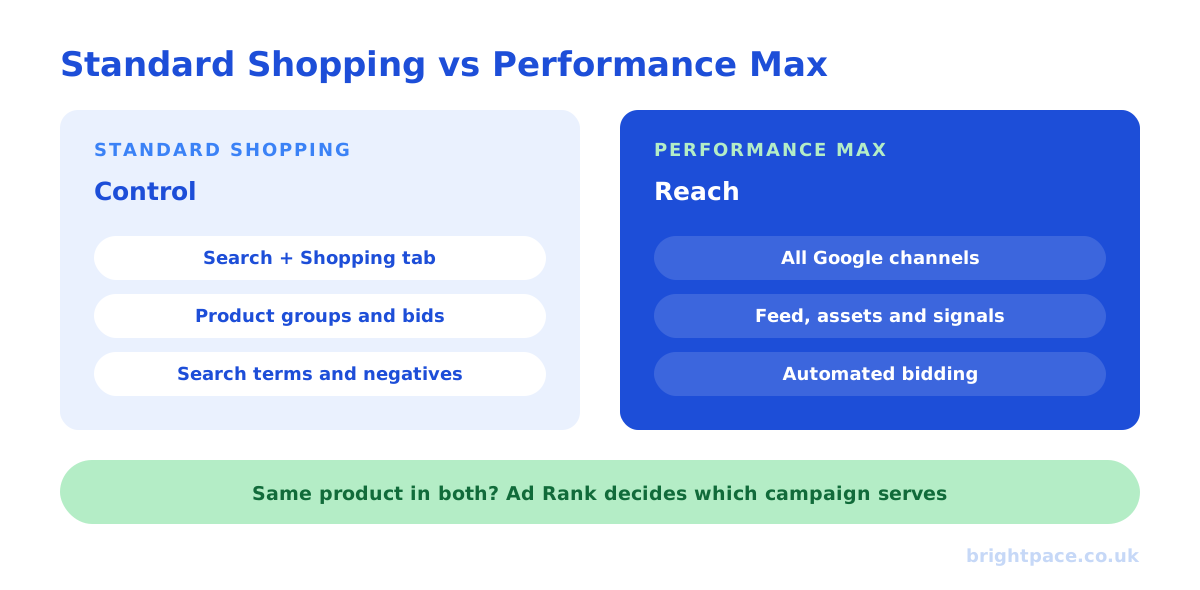
Performance Max and Standard Shopping can both show your products in Google’s Shopping ads, but they work very differently. Standard Shopping shows product ads mainly on Google Search and the Shopping tab, with hands-on control over products, bids and search terms. Performance Max uses one automated campaign to show ads across all of Google, Search, Shopping, YouTube, Display, Discover, Gmail and Maps, with less manual control and more reliance on your feed, creative and conversion data. Most retailers get the best results running Performance Max as the main engine and Standard Shopping where they need tighter control.
This guide compares the two side by side, explains how they compete when you run both, and shows when to use each.
The key differences at a glance
| Standard Shopping | Performance Max | |
|---|---|---|
| Where ads show | Mainly Search results and the Shopping tab | Search, Shopping, YouTube, Display, Discover, Gmail and Maps |
| Ad formats | Product ads from your feed | Product ads plus text, image and video assets |
| Bidding | Manual CPC or Smart Bidding | Smart Bidding only (conversion value or conversions) |
| Product control | Product groups with their own bids | Asset groups and listing groups |
| Search term control | Full search terms report and negative keywords | Search terms report, brand exclusions and campaign negatives |
| Audiences | Remarketing and customer lists as observation or bid adjustments | Audience signals as hints to the automation |
| Reporting | Detailed by product and search term | Improving: channel, asset and search term reporting |
| Best for | Control, testing, specific products or brands | Scale across Google with strong data and creative |
How Standard Shopping works
Standard Shopping takes your products from Google Merchant Center and shows them as Shopping ads when someone searches for something relevant. You group products into product groups, set bids or a Smart Bidding target for each, and use negative keywords to stop ads showing on searches that don’t convert.
Its strength is control. You can see exactly which searches triggered your ads, cut the ones that waste money, and set different bids or priorities for different products. That makes it useful for testing, for protecting margin on specific lines, and for accounts that don’t yet have enough conversion data for heavy automation.
The trade-off is reach: Standard Shopping stays mostly within Search and the Shopping tab, and doing it well takes more ongoing management.
How Performance Max works
Performance Max (PMax) is Google’s all-in-one campaign type. You give it a budget, a conversion goal, your product feed and a set of creative assets, headlines, descriptions, images and video, and Google’s automation decides where to show ads and to whom across all of its channels.
You guide it rather than steer it directly:
- Asset groups organise products and creative by theme
- Audience signals (such as customer lists) tell it who to look for first
- Brand exclusions, campaign-level negative keywords and the search terms report keep spend away from searches you don’t want
- New customer acquisition settings let you value or prioritise new buyers over existing ones
Its strength is reach and automation. With good conversion data, a clean feed and enough budget, PMax can find sales across channels Standard Shopping never touches. Its weakness is that it will happily spend on easy wins, your own brand searches, existing customers and remarketing, that make the reported return look better than the real one. See our Performance Max best practices for how to set it up properly.
Do they compete in the same auction?
They can. If Standard Shopping and Performance Max both advertise the same product in the same account, Google used to give Performance Max priority automatically. Since late 2024, Google instead uses Ad Rank, based on factors such as your bid and ad quality, to decide which campaign serves the ad.
In practice, that means running both is now a genuine choice rather than Standard Shopping quietly sitting idle. It also means overlap needs managing: be clear which products each campaign is responsible for, and check that one isn’t simply taking sales the other would have won anyway.
When to use Standard Shopping
- You’re new to Shopping ads and don’t yet have much conversion data
- You need tight control over specific products, brands or price bands
- You want to test, for example a new product line or a bidding strategy, with clean, readable results
- Your margins are thin and you can’t afford automation spending on low-margin lines
- You want to see and control exactly which searches you pay for
When to use Performance Max
- You have reliable conversion tracking with accurate values (see GA4 key events)
- You have enough volume, regular conversions every week, for the automation to learn
- Your product feed is in good shape, with strong titles, attributes and images
- You can supply good creative, including images and ideally video
- You want to scale beyond Search across YouTube, Display and Discover
Running both together
For many retailers the best answer is both. Common structures include:
- PMax for most products, Standard Shopping for the exceptions: hero products, new launches or low-margin lines you want to control closely.
- Split by margin: PMax for high-margin products where automation has room to work; Standard Shopping for tight-margin products with stricter targets. Custom labels in your feed make this easy.
- Standard Shopping as a control: run a small Standard Shopping campaign to compare against PMax and check what the automation is really adding.
Whichever you choose, judge both on the same business numbers: profit, new customers and blended return, not each campaign’s own reported ROAS. Our ROAS calculator works out your break-even point.
Common mistakes
- Letting PMax spend on brand searches. Use brand exclusions, or results will be flattered by people who were already looking for you.
- No customer-list exclusions or new-customer goals, so the campaign mostly re-acquires existing buyers.
- A weak product feed. In both campaign types, the feed is the targeting: fix titles, attributes and disapprovals first.
- Judging PMax on platform ROAS alone. Check it against blended revenue and run tests where you can: see what is a good ROAS?
- Overlapping campaigns with no plan, so products are pulled in two directions.
Selling on Shopify? Our guide to Google Shopping for Shopify stores covers set-up, feeds and managing to profit.
FAQs
Is Performance Max replacing Standard Shopping?
No. Standard Shopping still exists and remains useful for control and testing. Google has invested heavily in Performance Max, but many retailers run both.
Which performs better, Performance Max or Standard Shopping?
It depends on your data, feed and creative. Performance Max often reaches more people and drives more sales at scale, but some of that can be brand and repeat-customer traffic. Compare them on profit and new customers, not reported ROAS.
Can I run Performance Max and Standard Shopping for the same products?
Yes. Google decides which one serves using Ad Rank, so it works, but plan the overlap so each campaign has a clear job, and check results at product level.
Do I need video for Performance Max?
It’s strongly recommended. Without your own video, Google may generate basic video from your images, which usually looks worse than something you’ve made.
How much budget does Performance Max need?
Enough to drive regular conversions each week so the automation can learn. If your budget only produces a handful of sales a month, Standard Shopping is often the better starting point.
In short
Standard Shopping gives you control over products, bids and search terms; Performance Max gives you reach across all of Google through automation. Use Standard Shopping when you need control or lack data, Performance Max when your tracking, feed and creative are strong, and often both, with a clear job for each.
Sources
The platform documentation and coverage this guide is checked against. Last checked October 2026.
- About Shopping ads, Google Ads Help
- About Performance Max campaigns, Google Ads Help
- Performance Max vs Standard Shopping: Google revamps ad auction for holidays, PPC Land
Running Shopping ads and not sure what’s really working? We manage Google Shopping and Performance Max for UK retailers, judged on profit, or start with a paid audit. Let’s chat.
Want a senior eye on your paid search?
Work directly with the founder: no juniors, no hand-offs, 30-day rolling contracts.