Google AI Max for Search campaigns is a one-click suite of AI features that expands which searches your ads can show for, writes new ad text to match them, and sends each searcher to the most relevant page on your site. Launched in May 2025, it’s now central to Google’s Search roadmap, and with Google automatically upgrading older features into AI Max from late 2026, every advertiser needs a plan for it.
Used well, AI Max finds profitable demand your keyword list misses. Used carelessly, it can spend money on the wrong searches, write off-brand ads and send people to pages that don’t convert. Here’s what it is and how to implement it on your terms.
What is Google AI Max?
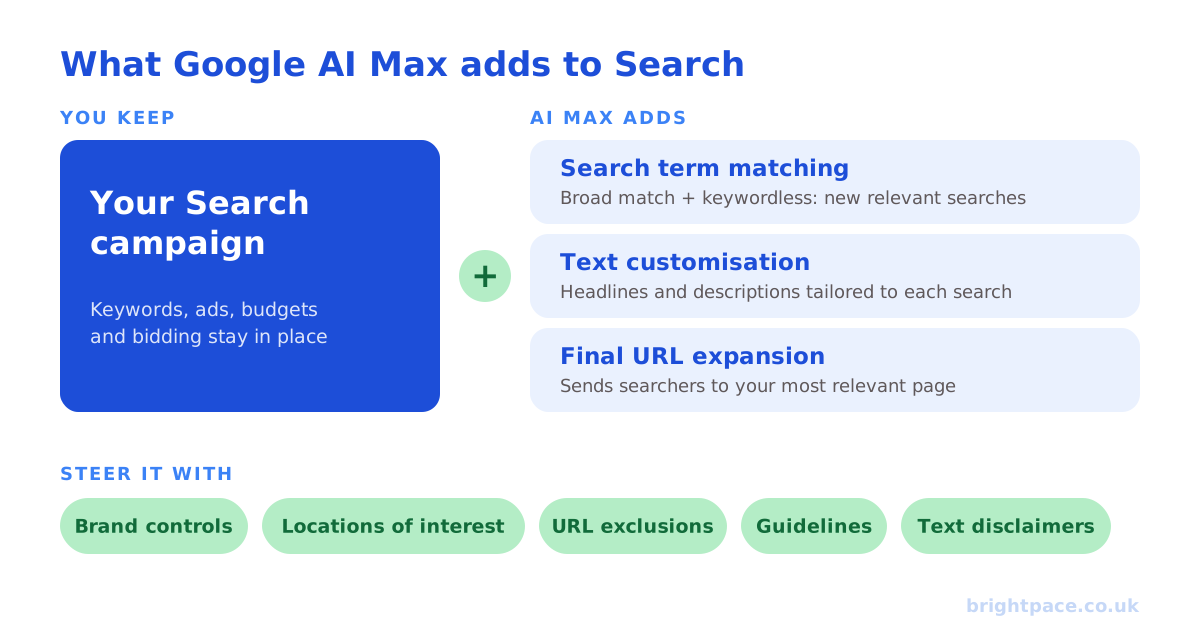
AI Max is an optional layer on top of a standard Search campaign. It doesn’t replace your campaign structure, keywords or budgets: it adds three features:
- Search term matching: uses broad match and “keywordless” technology (reading your landing pages and assets) to show your ads on relevant searches you haven’t explicitly targeted.
- Text customisation: generates new headlines and descriptions based on your landing pages, existing ads and keywords, tailored to each search. It replaces what used to be called “automatically created assets”.
- Final URL expansion: lets Google send each searcher to the page on your site it judges most relevant, rather than only the final URL you set.
Alongside them come controls to steer it, and that’s where good implementation lives.
The controls that matter
AI Max gives you more steering than older automation did. The most important:
- Brand inclusions and exclusions at campaign and ad group level, so non-brand campaigns don’t quietly start bidding on your own brand, or competitors’ brands you don’t want.
- Locations of interest at ad group level, for targeting based on the place people are searching about.
- URL controls: exclude pages that shouldn’t receive paid traffic, such as blog posts, careers pages or low-converting content.
- Guidelines: Google’s 2026 AI Brief lets you set messaging guidelines (what ads should and shouldn’t say), matching guidelines (searches to capture or avoid) and audience guidelines.
- Text disclaimers: guarantee legally required wording always appears in your ads, even with final URL expansion switched on. Valuable in regulated sectors.
- Reporting: AI Max shows which search terms and landing pages it matched, so you can see what it’s actually doing and add negatives. New columns (October 2026) also show which campaigns use brand inclusions, locations of interest and optimised targeting: see below.
AI Max brand inclusions and exclusions
Brand controls are the most important AI Max setting to get right, because they decide whether your brand and non-brand results stay honest. Both work from brand lists you build in Google Ads, choosing brands from Google’s list or adding your own.
- Brand inclusions limit AI Max’s search term matching to searches that mention the brands on your list. Use them on brand campaigns: AI Max can then pick up variations such as “[your brand] reviews” or “[your brand] [product]” without drifting into generic searches.
- Brand exclusions stop AI Max’s broader matching from showing your ads on searches that mention the listed brands. Use them on non-brand campaigns: exclude your own brand so non-brand results aren’t inflated by people already looking for you, and exclude competitors you don’t want to bid on.
Both can be set for the whole campaign or, for more control, per ad group. They steer AI Max’s expanded matching; your own keywords still need their usual negatives. Check the brand inclusions column in your campaign view to see which campaigns use them.
A simple set-up for most accounts: a brand campaign with brand inclusions for your own brand, and every non-brand campaign with a brand exclusion for your own brand. That keeps the two apart, so you can judge non-brand AI Max on the new demand it finds.
What’s changing in 2026
This is the part many advertisers will miss. Google is folding older features into AI Max:
- Since September 2026, campaigns using automatically created assets or campaign-level broad match settings are being automatically upgraded to AI Max: check whether any of yours already have been.
- Dynamic Search Ads are being retired. Google has set February 2027 for the DSA sunset and the automatic upgrade of remaining DSA campaigns.
Automatic upgrades mirror your old settings, but you’ll get a better result by upgrading deliberately, with your own guardrails in place, than by waiting to be switched over. If you run DSA or rely on automatically created assets, plan your move now.
Latest updates (October 2026)
Two changes make AI Max easier to control.
1. Preview AI Max ad copy before you switch it on. You no longer have to turn on text customisation to see what Google would write. Once you add a final URL, Google generates up to 10 sample headlines and descriptions in the asset optimisation section, both when you create an AI Max campaign and when you edit an existing one, without opting in.
- Set your guidelines first. The preview is filtered by your text guidelines (words to exclude, themes to avoid), so it shows what those rules actually produce. If the rules are too strict to generate anything, Google prompts you to loosen them.
- Treat the samples as examples. They show the kind of copy Google will write, not the exact ads that will serve.
- Keep checking after launch. Google says generated text only serves when it’s predicted to beat your own headlines and descriptions: review what actually ran in the ad-level asset report for your responsive search ads.
- In regulated sectors, it’s a first filter, not sign-off. Law firms, healthcare and financial services still need a proper compliance review, and text disclaimers.
2. New columns for auditing AI Max settings. Google is rolling out columns that show, at a glance, where three AI Max controls are in use across your campaigns:
- Brand inclusions: which campaigns are restricted to specific brands.
- Locations of interest: which campaigns target the places people search about, not just where they are.
- Optimised targeting: where Google’s automated audience expansion is switched on.
They don’t change how AI Max works, but they make it much quicker to spot a campaign set up differently from the rest, especially after Google’s automatic upgrades. They’re still rolling out, so they may not be in every account yet.
What Google says AI Max delivers
Google’s own figures, with the conditions it gives:
- When AI Max launched, Google said advertisers activating it typically see 14% more conversions or conversion value at a similar CPA or ROAS: rising to 27% for campaigns still using mostly exact and phrase match keywords.
- In 2026, Google reported that AI Max campaigns using the full feature suite see an average of 7% more conversions or conversion value at a similar CPA/ROAS than using search term matching alone (non-retail advertisers).
These are Google’s averages from its own data. They’re a reason to test AI Max, not a guarantee: your results depend on your tracking, your site and your controls.
Is AI Max right for your account?
Strong fits:
- Accounts with accurate conversion tracking and meaningful conversion volume
- Exact- and phrase-heavy accounts that may be missing relevant demand
- Sites with rich, well-structured landing pages for Google to read, especially eCommerce
Proceed carefully:
- Weak or inflated conversion tracking: AI Max will optimise hard toward whatever you count
- Regulated industries such as law and healthcare, where ad wording matters: use text disclaimers, guidelines and close asset review
- Niche B2B offers where “relevant-looking” searches often aren’t your buyers
- Very small budgets, where exploratory matching can use up spend before it learns
How to implement AI Max: step by step
- Fix measurement first. AI Max is only as good as the signals you give it. Make sure conversions are accurate, valued properly and, for lead generation, fed back with offline conversion imports so it learns which leads become customers. A paid media audit is the fastest way to check.
- Start with an experiment. Use Google’s one-click experiments on a representative campaign rather than switching the whole account on at once. You get a clean comparison against your current setup.
- Set guardrails before launch. Add brand exclusions, URL exclusions for pages that shouldn’t get paid traffic, negative keywords, and messaging and matching guidelines. In regulated sectors, add text disclaimers.
- Consider each feature on its merits. Search term matching is usually the biggest lever. Check the text customisation preview against your brand voice before switching it on, and if you also write your own ads, check them with our Google Ads ad preview tool. Pair final URL expansion with URL exclusions.
- Keep brand and non-brand separate. Use brand controls so AI Max doesn’t inflate results by picking up searches you’d have won anyway.
- Give it time and volume. Judge over several weeks with enough conversions to be meaningful, not after a few days.
- Review search terms and assets weekly. Add negatives, remove off-brand text and tighten guidelines as you learn. Add the new brand inclusions, locations of interest and optimised targeting columns to your campaign view, so settings that differ stand out.
- Judge on business outcomes. Compare cost per acquisition and ROAS against your targets, check them with our CPA and ROAS calculators, and look at lead quality and new customers, not just platform-reported conversions.
Notes by business type
- eCommerce: Google has extended AI Max to Shopping campaigns, using Merchant Center product data. A clean, well-optimised product feed matters more than ever: see our eCommerce approach.
- Lead generation: Broad matching can find more leads and more junk. Offline conversion imports and qualified-lead goals keep it honest.
- Regulated sectors: For law firms and dental practices, text disclaimers, messaging guidelines and tight URL controls are essential before switching on text customisation or final URL expansion.
Common mistakes
- Waiting for the automatic upgrade instead of migrating on your own terms
- Switching on AI Max across the whole account without an experiment
- Leaving brand controls and URL exclusions empty
- Switching on text customisation without checking the copy preview first
- Optimising to soft or duplicated conversions
- Judging results in days instead of weeks
- Taking Google’s average uplift as a forecast for your account
FAQs
How is AI Max different from Performance Max?
AI Max is a setting inside a normal Search campaign: you keep your ad groups, keywords and budgets, and it only serves on Search. Performance Max is a separate campaign type that runs across all of Google’s channels: Search, Shopping, YouTube, Display, Discover, Gmail and Maps.
Does AI Max mean keywords no longer matter?
No. Your keywords still tell Google what you want to appear for, and they anchor the matching. AI Max adds searches you haven’t listed, so strong keywords and a good negative keyword list matter just as much as before.
Can I switch off individual AI Max features?
Yes. Search term matching is the core of AI Max, but text customisation and final URL expansion can be turned on or off separately: useful if you need tight control over ad wording or landing pages.
Can I see AI Max’s ad copy before turning it on?
Yes. Since October 2026, Google shows up to 10 sample headlines and descriptions written by AI Max once you add a final URL: before you opt in to text customisation. Set your text guidelines first, because the preview is filtered by them, and treat the samples as examples rather than the exact ads that will run.
What are AI Max brand inclusions?
A setting that limits AI Max’s search term matching to searches mentioning brands on your list. It’s mainly for brand campaigns, so AI Max can find variations of your brand searches without spending on generic ones. Brand exclusions do the opposite, and belong on non-brand campaigns.
Is AI Max worth it for a small account?
Test it carefully. Exploratory matching can use up a small budget before it has enough data to learn. If your tracking is solid, run it as an experiment on one campaign and compare cost per conversion before rolling it out.
In short
AI Max is Google’s future for Search campaigns, and Dynamic Search Ads and older automation features are being folded into it through 2026 and early 2027. The brands that benefit will move deliberately: fix measurement, test with an experiment, set brand, URL and messaging guardrails, and judge results on real business outcomes. Structure matters too: our guide to structuring campaigns for automation covers the foundations.
Sources
The platform documentation and coverage this guide is checked against. Last checked October 2026.
- About AI Max for Search campaigns, Google Ads Help
- How AI Max for Search campaigns works, Google Ads Help
- Set up AI Max for Search campaigns, Google Ads Help
- About AI Max experiments, Google Ads Help
Want AI Max working for your account, not against it? See our PPC management, book a paid media audit before the automatic upgrades reach you, or let’s chat.
Want a senior eye on your paid search?
Work directly with the founder: no juniors, no hand-offs, 30-day rolling contracts.