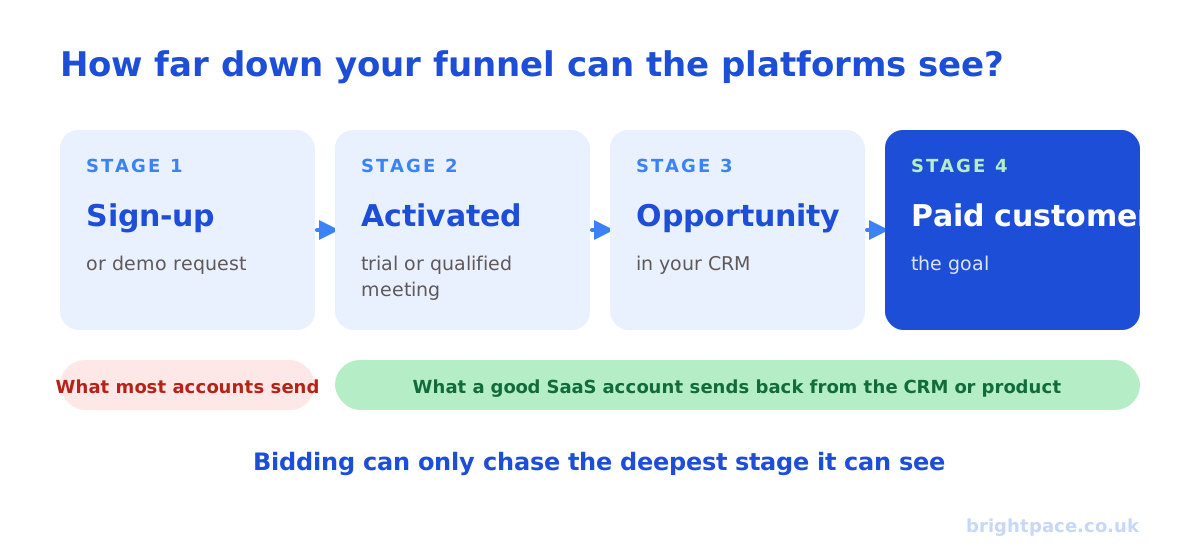
A SaaS PPC audit checks one thing above everything else: whether your Google Ads and LinkedIn campaigns are optimising towards customers who pay, or towards sign-ups, demo requests and trials that never turn into revenue. Most SaaS ad accounts look healthy in the platforms and disappointing in the CRM, because the platforms only see the top of a funnel that runs for weeks or months. This checklist covers the 15 points we check in every SaaS PPC audit, in the order we check them, for product-led, sales-led and hybrid SaaS.
For a general Google Ads audit, see our 12-point Google Ads audit checklist. This guide covers what’s different about SaaS.
Before you start
- Know your unit economics. Average contract value (ACV), gross margin, churn and the payback period you can afford. Without them, you can’t say what a trial, a demo or a customer is allowed to cost. Our LTV:CAC calculator helps.
- Get access beyond the ad platforms. Google Ads, LinkedIn Campaign Manager, GA4, and your CRM or product analytics (HubSpot, Salesforce, or wherever trials, activation and paid conversions live).
- Pick a date range that fits your sales cycle. At least 90 days, and longer for sales-led SaaS where deals take months. Recent spend won’t have had time to turn into revenue yet.
- Write down your funnel. For example: visit → sign-up or demo request → activated trial or qualified meeting → opportunity → paid customer. You’ll audit each stage against what the platforms can see.
Part 1: Measurement
1. What is each platform optimising to?
Check the primary conversions in Google Ads and the conversions each LinkedIn campaign optimises to. If the answer is “sign-ups” or “form fills” and nothing further down the funnel, Smart Bidding and LinkedIn’s delivery are finding the cheapest people to fill in a form, not the most likely to pay.
What good looks like: the deepest stage with enough volume is primary, such as activated trials, qualified demos or opportunities, with values that reflect what each stage is worth.
2. Do trials, demos and deals flow back to the platforms?
This is where most SaaS accounts fall down. Check whether:
- Google Ads receives later stages through offline conversion imports or a CRM connection, with the click ID (GCLID) captured on sign-up and enhanced conversions for leads switched on.
- LinkedIn receives qualified leads, opportunities or paid customers through its Conversions API or a CRM integration, not just the Insight Tag on a thank-you page.
- Product events like activation or upgrade reach the platforms for product-led SaaS, where the sale happens in-app rather than in a CRM.
3. Do the platform numbers match your own?
Compare sign-ups, trials and demos reported by Google Ads and LinkedIn with your CRM or product data for the same period. Large gaps usually mean duplicate tags, missing consent handling, sign-ups counted twice (on the form and again on the welcome page) or bots.
What good looks like: platform numbers close to your own records, with known reasons for any difference.
4. Are you tracking the full SaaS funnel?
Check you can see, by campaign: sign-ups, activated or qualified trials, opportunities, paid customers and revenue. If you can’t trace a paying customer back to a campaign, you can’t judge CAC by channel, and you’ll keep scaling whatever produces the most cheap sign-ups.
Part 2: Targets and budget
5. Are targets set from CAC and payback?
Check target CPA or target ROAS settings, and LinkedIn bid strategies, against your economics. A good SaaS target works back from what a customer is worth and your payback period, through your conversion rates, to what each trial or demo can cost.
Example: if a customer can cost £1,200, one in five qualified demos becomes a customer and half of demo requests qualify, a demo request can cost around £120.
6. Is budget split by intent?
Check how spend divides between brand, competitor, high-intent category searches (“CRM software for agencies”), problem searches and LinkedIn prospecting. SaaS accounts often overspend on top-of-funnel LinkedIn and Display while high-intent search is limited by budget, or the reverse.
Part 3: Google Ads
7. Search terms and wasted spend
Review search terms for the last 90 days, including Performance Max and AI Max. SaaS waste usually comes from:
- Free and DIY searches: “free”, “open source”, “template”, “excel”, “tutorial”.
- Job and learning searches: “jobs”, “salary”, “course”, “certification”, “what is”.
- Login and support searches from existing customers: “login”, “sign in”, “support”, “cancel”.
Add negatives, and check that existing-customer searches aren’t being counted as new sign-ups.
8. Brand and competitor campaigns
- Brand: is brand separated from non-brand, so you can see what non-brand really costs? Is Performance Max or AI Max quietly claiming brand searches? Use brand exclusions if so.
- Competitors: competitor campaigns can work for comparison-stage buyers, but check their CAC separately, because clicks are often expensive and sign-up quality varies. Bidding on competitor names as keywords is generally allowed, while using their trademarks in ad text can be restricted.
9. Landing pages match intent
Check that each campaign sends people to a page that matches what they searched: comparison pages for competitor searches, use-case pages for category searches, and pricing or demo pages for high-intent searches. Sending everything to the homepage is one of the most common SaaS PPC mistakes. If Performance Max or AI Max can pick landing pages, check which pages get traffic and exclude the ones that shouldn’t. Our Performance Max audit guide shows how.
10. Automation is controlled
Check how Performance Max and AI Max are set up. Both can reach far beyond your keywords, which suits some SaaS businesses but can flood a sales team with low-quality sign-ups. See our guides to Performance Max for lead generation and Google AI Max.
Part 4: LinkedIn
11. Audiences match your ideal customer profile
Check targeting against your ideal customer profile: company size, industry, job function and seniority. Look for:
- Audiences that are too broad, such as whole job functions with no seniority filter.
- Audiences too narrow to deliver, which drive up costs.
- Audience expansion and the LinkedIn Audience Network, which can widen reach beyond what you chose. Check whether they’re on, and whether the extra reach converts.
- Missing exclusions for existing customers, competitors, your own employees and job seekers.
- Unused first-party data: company lists for account-based targeting, contact lists and website retargeting.
12. Formats and lead gen forms
Check which formats are running and what they deliver. Lead Gen Forms usually produce cheaper leads than sending people to your website, but quality can be lower. Check how they score once they reach your CRM, and whether forms ask the qualifying questions your sales team needs. Our guide to what LinkedIn ads cost in the UK has typical costs per lead.
13. Creative freshness
LinkedIn audiences are small and see the same ads often. Check how long each ad has been running, how frequency has changed and whether click-through rates are falling. Most SaaS accounts need genuinely new ads every few weeks, not small edits to old ones.
Part 5: Reporting and proof
14. Reports show pipeline, CAC and payback
Check what you get each week or month. A good SaaS PPC report shows trials, activation, qualified pipeline, paying customers, CAC and payback by channel, alongside the platform numbers, and says what changed and what happens next. See what a PPC report should include.
15. You can show what paid media adds
Platforms take credit for sign-ups that would have happened anyway, especially brand searches and retargeting. Check whether you have any evidence of what paid media genuinely adds: a holdout or lift test, or at least a blended view of CAC across all channels. For bigger budgets, marketing mix modelling can help.
How to prioritise what you find
Fix problems in this order:
- Measurement (points 1 to 4). Until the platforms can see trials, deals or paid customers, every other optimisation is aimed at the wrong target.
- Targets and budget (5 and 6). Set CAC-based targets and move budget towards high intent.
- Waste (7 to 13). Search terms, brand and competitor separation, landing pages, LinkedIn audiences, forms and creative.
- Proof (14 and 15). Reporting on pipeline and payback, then a test of what paid media genuinely adds.
SaaS PPC audit checklist
| # | Check | Platform | What good looks like |
|---|---|---|---|
| 1 | Optimisation goal | Both | Deepest stage with enough volume is primary |
| 2 | Funnel data flows back | Both | Trials, deals or paid customers sent from CRM or product |
| 3 | Numbers match | Both | Platform sign-ups close to CRM records |
| 4 | Full funnel visible | Both | Paying customers traced back to campaigns |
| 5 | Targets | Both | Set from CAC and payback, not round numbers |
| 6 | Budget split | Both | High-intent search not starved |
| 7 | Search terms | Free, jobs, login and support searches excluded | |
| 8 | Brand and competitors | Separated, with their own CAC | |
| 9 | Landing pages | Matched to intent, not all to the homepage | |
| 10 | Automation | PMax and AI Max controlled and checked | |
| 11 | Audiences | Match your ICP, with exclusions and first-party lists | |
| 12 | Formats and forms | Lead quality checked in the CRM | |
| 13 | Creative | New ads every few weeks | |
| 14 | Reporting | Both | Pipeline, CAC and payback by channel |
| 15 | Proof | Both | Lift test or blended CAC view |
Common SaaS PPC mistakes
- Optimising to sign-ups. The platforms find people who sign up, not people who pay.
- No click ID on the sign-up form. Without it, later stages can’t be matched back to Google Ads clicks.
- Brand mixed into non-brand. Brand makes non-brand look cheaper than it is.
- Everything to the homepage. Comparison, use-case and pricing searches each need their own page.
- LinkedIn judged on cost per lead. Cheap Lead Gen Form leads that sales never converts aren’t cheap.
- Judging results too early. For sales-led SaaS, last month’s spend hasn’t turned into revenue yet.
Frequently asked questions
What is a SaaS PPC audit?
A SaaS PPC audit reviews your paid search and paid social accounts, usually Google Ads and LinkedIn, to check whether they’re optimising towards customers who pay. It covers tracking from sign-up to paid customer, CAC and payback targets, wasted spend, audiences, landing pages and reporting, and ends with a prioritised list of fixes.
How often should a SaaS company audit its PPC?
Do a full audit when you change agency or hire in-house, after big changes to pricing or your funnel, and at least twice a year. Check search terms, LinkedIn audiences and creative fatigue monthly.
What’s the most common problem in SaaS ad accounts?
Optimising to the wrong conversion. Most SaaS accounts tell Google Ads and LinkedIn that a sign-up or demo request is the goal, so the platforms find more cheap sign-ups, many of which never pay. Sending trials, deals and paid customers back from your CRM or product usually has the biggest impact.
Should a SaaS PPC audit include LinkedIn?
Yes, if you run LinkedIn ads. For sales-led, higher-value SaaS, LinkedIn is often the biggest line in the budget and the hardest to judge, because its leads take longest to turn into revenue. For low-price, self-serve products, search and Meta often matter more.
How much does a SaaS PPC audit cost?
It varies by provider and depth. Brightpace’s fixed-price paid media audits cost £195 for one platform or £395 for up to three, covering campaigns, tracking and how trials and demos are measured, with a prioritised action plan you keep.
In short
A SaaS PPC audit checks whether Google Ads and LinkedIn are optimising towards customers who pay. Start with measurement: what each platform optimises to, whether trials, deals and paid customers flow back from your CRM or product, and whether the numbers match. Then set targets from CAC and payback, cut waste in search terms, brand, competitors, landing pages, audiences and creative, and finish with reporting on pipeline and a test of what paid media genuinely adds.
Comparing agencies to run it? See the best B2B SaaS marketing agencies in the UK and the best LinkedIn Ads agencies in the UK.
Sources
The platform documentation this checklist is checked against. Last checked October 2026.
- About offline conversion imports, Google Ads Help
- About enhanced conversions for leads, Google Ads Help
- About brand exclusions, Google Ads Help
- Trademarks policy, Google Advertising Policies Help
- LinkedIn Conversions API, LinkedIn Marketing Solutions Help
- LinkedIn Audience Network, LinkedIn Marketing Solutions Help
Want a second pair of eyes on your SaaS ad accounts? Book a fixed-price paid media audit, see how we work as a SaaS PPC agency, or let’s chat about your funnel.
Want a senior eye on your paid search?
Work directly with the founder: no juniors, no hand-offs, 30-day rolling contracts.